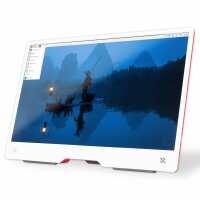
“I hooked my new Pi 5 to my spare Dell monitor and only ever saw the boot screen for the Pi 5! After hours of debugging it turner out that the Pi 5 had been working flawlwssly from the start - the problem was that the Dell monitor permanently ignores any video signal if the signal stops at any point, as it does between boot screen and normal operation of the Pi... Solution: get a Pi Monitor - completely perfect now. It also looks kinda cool...”
“Great monitor Works well with the raspberry pi. Small enough to move around. I use it as a second monitor for tinkering and setting up other pi projects.”

“It works well, its compact, its low power so potentially can be powered from a RPI USB port with reduced backlight. This might be advantageous if you have a low voltage battery supply. It doesn't have height adjustment unless you put an object underneath it. Regular PC monitors may have more features and are usually larger.”
“I purchased the Raspberry Pi Monitor to pair with my Raspberry Pi setup, and overall it’s a great companion display for small projects and desktop use.
The monitor is easy to set up and works exactly as expected with a Raspberry Pi system. The size is ideal for a compact desk setup, and the display quality is perfectly adequate for coding, monitoring dashboards, or running lightweight desktop environments. It feels well-suited for anyone building a tidy Raspberry Pi workstation.
One of the biggest advantages is how neatly it integrates into a Pi ecosystem. It keeps everything compact and avoids the need for a full-sized monitor, which is great if space is limited or if you’re building a dedicated Pi station.
While it’s not intended to compete with high-end desktop monitors, it does exactly what it needs to do: provide a simple, reliable display for Raspberry Pi projects.
Overall, I would recommend it for anyone looking for a clean, straightforward monitor solution for their Raspberry Pi setup.”
“No major issues after about a week of use, has significantly increased the portability of my ~2 year old unused pi 400
Only slight gripe is the power and vol/brightness buttons are difficult to tell apart by feel.”
“A great budget option for a monitor. Looks great in the white/raspberry colour scheme. Usb-c power port and a full size HDMI port plus brightness/power/volume controls to the rear. Small stereo speakers mounted in the frame means that I don't need to bother with additional speakers for listening to uTube vids, although if you're planning on listening to music then a better pair of speakers are probably needed.
One thing to note, make sure you use a PSU and not a charger to power the device as a charger may have incorrect power delivery for the monitor meaning that it may not wake from sleep correctly. I swapped from an Anker charger to an official Raspberry Pi PSU and the issue was resolved.
At 250 nits max brightness the display will struggle in bright sunlight but this is nitpicking at this price point. Overall a fantastic monitor. Highly recommended.”