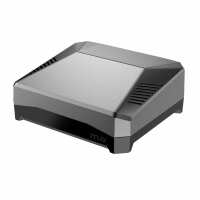
“Not sure whats not to love about this case. Its very well built, the cooling is more then enough for my PI4 8GB running as a desktop. The conversion to regular HDMI cables is a nice addition too.
Arrived really fast before Christmas when there were delays all over for other suppliers.”
“Super charge your raspberry Pi! This is one piece of well built kit - LEDs visible out the front, and nice to have the normal size HDMI ports if you need them. And a neat access to the pins on top with a magnetic cover if you don't need access to it. The only item that would have made it even better was that the microSD card slot is not physically accessible once you screw in all the pieces - so if you were intending on replacing the card regularly you'd have to unscrew and disconnect the special dongle connecting to the SSD storage. But I only needed to transfer the image of the microSD card into the SSD and boot from that so no need the slot for day to day use!”
“This case is superb, It keeps my PI cool with its mild overclock, I have a proper SSD in there booting into Linux and it's all very compact, neat and looks really quite professional. I'm using my PI to host a website, git server and SQL database and this case helped me make that happen.”
“After purchasing a Pi Model 4 B, was looking for a case to create a small desktop set-up. After reviewing a few options, the Argon One M.2 was top of my list due to the SSD and cooling features. After looking at the usual online places (Amazon etc) I opted to buy from Pi Hut which was selling this case at an excellent price compared to others. Transaction was smooth and I am very happy with the product. My first time using Pi Hut. It wont be my last!”
“Fast delivery, very good packaging, all items included. Perfect for Pi4 with the additional cooling fan build into the case, keep the Pi at a low temperature.”
“This really is an excellent case. Very easy to set up and the full size HDMI ports are a blessing, no more hunting for adapters. Having all the ports at the back is easier and the on/off button works well. I thought at first that using the GPIO extender might entail some handiwork but it fitted with room to spare. Downloading and running the fan and switch software was no problem and the Pi has rarely gone over 49oC although I have yet to stress test it.
Fitting a 250GB SATA SD again was no problem but the Pi didn’t seem to recognize it (probably due to me not knowing what to do)I could see it listed using lsblk but that was all. I took the drive out and fitted it to a PC to mount and format it, put it back in the Pi and it showed up no problem.
I downloaded Raspberry Pi Imager to set the drive up with Raspberry Pi OS and that was it.
The speed difference is very noticeable. I now have the Pi setup as I want it and made a backup onto a 16GB sd card using the Pi’s SD Card Copier (this does require patience). I cannot recommend this case enough.”