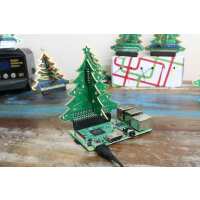
“I bought the pre assembled version and fired it up using a model B v2 but only half the LEDS Illuminate. Whilst no 19 is very bright compared to the others. Anyone know why?”
“Not everyone can solder in their sleep from the age of 15. This is a good project if you have someone to help you with the soldering, or if you need practice with soldering. After weeks of painstaking soldering, desoldering and resoldering most of my leds work. I could not get the top led to work. Does anyone know what GPIO number it is?
The sample program is perfect. The only thing I'd like to add is some kind of a light sensor to have it switch on in the dark - but there are no spare GPIOS.
I'll definitely buy a new one next year. Hopefully the soldering will be neater and I'll get *all* the leds working.”
“i really liked the x-mas-kit. i ordered myself a soldering kit, it was fun to assemble it by myself. then i followed the instructions and found other users which coded some examples - what can i say, now decorating the IT-office and everybody seems to enjoy the geeky little thing. Thank you for the inspiration and all the fun!”
“We've had fun with the pre-soldered kit. I think I'll order a soldering one - and learn to solder! before next Christmas.
A question - does anyone have other resources for programming it? I was looking at http://gpiozero.readthedocs.io/en/stable/recipes_advanced.html#ledboard-advanced to try to get an idea about how we might programme it. I'm guessing that in the array for the LEDs we'd have to have the numbers 0-20 or however many lights there are!”
“I bought two, one for me and one for my 10 year old step-son. Super easy to solder and build!! The instructions are straight forward. I had my own 3mm LEDs so I swapped out some of the reds for blue and green. Love this little project!!!”
“An excellent kit. Easy to assemble for an experienced soldered. The only change I made was to slow down the flashing rate slightly in the python script.”