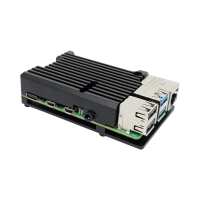
“Great heatsink purchased a few now to colour-code my pis.
They have kept things cool without any active fans, and also make handling much simpler. The extra heat pads are also good if you make any mistakes or need to do some tinkering.”
“Very easy to fit and the spare pads were very handy. There might be a market for one with mechanical connection points to allow easy bolting into another case (with suitable ventilation)?”
“Bought this to replace an official case as the Pi was overheating despite the official case having a fan fitted, this does the job perfectly, no more overheating, this will be my case of choice in the future. The only drawback is it limits access to the GPIO pins, particularly for boards that connect here eg Phoscon RaspBee II.”
“Built a NAS with a Pi 4 and started with the standard plastic case and the set of 4 heatsinks (they do look good!) and now with this heatsink case.
My findings (degrees C at idle / sustained write over WiFi ):
Plastic case closed and 4 x heatsinks fitted: 60 idle / 70+ loaded
Open heatsink (case top removed and Pi sitting on its side to allow natural airflow): 50 idle / 60-65 loaded
Armour heatsink: 40 idle / 45 loaded
I've yet to mount the Pi to a drive bay of some kind and neaten things up I doubt it'll have much impact on these figures.
This is a great solution if you want a silent running rig. I haven't measured the effect on WiFi signal strength (I did wonder about all that metal around the pcb possibly masking the signal) but transfer speeds remain the same as with the plastic case. It's easy to assemble the heatsink around the Pi and it looks superb, too!
Drives: Two WD 240G SSD in RAID 1. OS: Ubuntu 22.04 server. Environmental conditions: about 20C, no forced air movement.
Hope this all helps someone else decide what to use for their project!”
“This is the second one I have purchased after the first worked so well I decided to purchase another temps dropped around 20c compared with no heatsink so works well and looks good too”