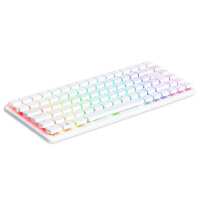
“I found this to be a very useful desktop pc. The feel of the new keyboard is a real plus. Unfortunately my unit has a faulty key. Putting customer service to test they responded quickly and an RMA promptly issued. Simple procedure at my local post office and it’s on its way back. Would highly recommend PiHut and will continue to purchase from them.”
“I've been tinkering with PI since the 3. Got a 400 a few years ago and enjoyed using it but none of the previous itterations have captured that feeling of excitement of gettting new computer like it was back in the 80s when your dad returned from W.H.Smiths or Tandy with a new box.
The TI99/4a, Atari 400, Beeb....all hold fond memories of coding, experementing and amazement at what this lump of plasic and metal with a keyboard attached could do.
The 500+ may be just a PI5 in a different case but it rekindles the feelings of yesteryear in a way that no laptop, macbook or previous pi ever have for me. It's by no means got retro performance, either. Far from it. This thing feels like a full on desktop. But what ever they did, what ever voodoo the designers added, it worked in a way that Johnny Ive (and Johnny Ball!) could only have dreamed of.”
“Looks cool.. however not sure is software problem of what, it always go to Raspberry Pi Imager when turn it on ( I am using the original 27W power supply). And if I move the keyboard when I using it. The screen black out as well”
“Bought this as a way to finally escape Windows bloatware and embedded A.I, as a Linux noob the ease of installation is a massive win. Build quality is very impressive, the SSD is slippery quick & 16GB ram is way more than I'll ever need. The icing on the cake is a superb mechanical keyboard that reminds me of my favourite cherry boards from days of old. These should fly off the shelf, especially when the desktop bundle goes on sale. Very very impressed.”
“The Pi 500+ comes almost ready to use. Just connect a monitor, mouse, and power cable, and you're good to go. It already has the operating system installed, so no need to worry about setting up software from scratch, the built-in keyboard is responsive and well-built, the RGB backlit switched keys look and feel superb to use, a very welcome upgrade from the 400/500 I already own. The form factor is compact — ideal for classrooms, hobby labs, or minimalist desk setups.
The 500+ handles all my general computing tasks with ease and is my daily driver for such, web browsing, media playback, and light image editing are all smooth, the extra onboard RAM along with the internal SSD are a very welcome upgrade.
All in all it's a capable little desktop. Whether you're a student, educator, or tech tinkerer, the Pi 500+ delivers a polished experience in a very accessible package.
Very glad I pulled the trigger on this, yes in fairness it is quite a jump in price from the 500, but I still think it's good value for money for what you get, I justified it even more as I can still picture my fathers face in 1983 when he saw the chunk of change he had to part with for my C64 :) so this doesn't feel so bad at all!.”
“The Pi500+ feels substantial, and well made. I had thought that I would need a separate micro SD card for installing the operating system, but the Pi booted from the SSD and the installation process went without problem. The keyboard feels very nice and the RGB lights are OK, and the white or red solid backlight will be nice in reduced light working. I haven't attempted to open the case yet to see what form factor the SSD is. I'm looking forward to using the extra memory and storage.”
“This is the first Raspberry Pi that works straight out of the box. It can do that because it is also the first Raspberry Pi to come with a built in disc drive that comes pre-loaded with an operating system. It is so simple to set up that pretty much anyone can do it. Basically you plug it into a monitor, or a TV, with an HDMI input, plug in a mouse (pretty much any one will do), a suitable power supply and finally plug the power supply into the mains. The device will take you through a simple setup procedure. When that's done you restart by pressing the power key at the top right of the keyboard and you are away.
There is a serious criticism at this point. The set up instructions are well hidden on the raspberrypi.com website. Go there and select 'Computers'. You then have to select 'Documentation' and go to the bottom of that page where you find a grey oblong with the caption 'Keyboard computers' and click on it. Unfortunately, this is a technical document with too much detail on too many models. What most users will actually need is the 'Raspberry Pi Beginners Guide 5th edition'. That is supplied as an e-book, in the folder 'Bookshelf' on the device's disc drive. Something of a Catch-22 situation here!
If you are confused, borrow a neighbour's child for a few minutes. Pretty much any 8+ year old will be able to sort the set up out for you. It really is child's play, you just have to know some basic rules.
The Raspberry 500+ is heavier than it looks. It's wedge shaped with all the connectors are along the back edge. The keyboard is mechanical with the keys moving by several millimetres when you hit them. The keys are back lit and the key captions transparent. With the back lighting off the key caps are not easy to read. A great design point is that it is very easy to adjust the colour and intensity of the back-lights using the function key (to the right of the space bar) together with the keys through in the top row. The Raspberian operating system will be very familiar to anyone who has used Windows 10 and in my experience is rock solid.
These are first impressions and I am very well impressed by this computer. If you're not sure about getting all the right bits then buy one of the starter kits that includes mouse, power supply etc. Getting the power supply right is essential, this computer really does need that 27W power supply. I consider this to be a well specified home computer that pretty much anyone can use. It's also adaptable. For example, those key caps can be swapped if the illuminated keyboard doesn't work for you. And it's also extensible through two high speed USB connections.and it has the GPIO pins hidden behind a pop-out cover if you are interested in experimenting with computer controlled devices. If you're wondering about replacing a Win 10 computer, there is a real contender in this Raspberry Pi computer.”