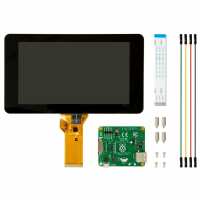
“I bought the official screen and a desk top case.
This is perfect for my home automation interface.
Touchscreen is fine, screen is sharp.
Had to rotate the screen via code for the case to sit on a desk, that wasn't hard.
Over all for the money this screen is great.”
“The screen looks great, but sadly, I will not be able to use it for what it was intended... When the raspberry pi also has a pi camera attached the pointer goes crazy as soon as you activated. It jumps all over the screen and clicks everywhere, causing a heap of terminals opening...”
“Got this screen working out of the box with the Pi3B. Nice things about how PiHut sends the screen is the 2 fiddly cables are already attached in place and the controller board already screwed to the back of the screen. All that's needed is to attach the cable that goes to the Pi.”
“The display is of decent quality. The screen size is somewhat small and I had Ubuntu Mate installed, which makes it sometimes hard to get to the buttons on windows requiring a larger screen. Together with the case, the display was upside down `lcd_rotate` (not `display_rotate`) in config.txt fixes this. When playing with it, it is hard to not forget it is not a tablet, but you are moving the cursor with the touch so scrolling is quite hard (having to drag the scrollbar). Maybe a different distro has better touch support.”
“Was amazing screen,everything about it was great except one problem which I don't know why. Whenever the volume is high, the screen shutdown and restart again. Please if you can help, I will appreciate it”
“Love this screen, needs lcd_rotate=2 to rotate 180 so iit's correct for the official case. Matchbox on screen keyboard in raspbian is not great but all works and os development will improve the interface of the brilliant screen.”
“Excellent service, delivered on time, even after email warning of delays due to pi3 release. The high quality visual display is great. Up and running in no time at all. To ensure no 'heart stopping' moments, make sure the power supply is as recommended (2A). My first power up was with a 1200mA supply, it didn't work! I would also recommend the MicroUSB Power Cable for a tidy solution to powering the pi and freeing up the GPIO pins.”