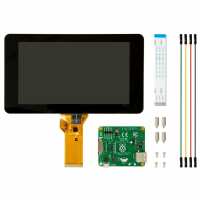
“The touchscreen works well and it's rather easy to connect and configure. Construction feels solid and everything looks very good indeed... Except when you turn it on. Resolution is quite low which is to be expected, but the viewing angles are abysmal.
But then again the display is rather cheap and large so one can't expect too much. I just wish they'd opted for an IPS screen instead.”
“Thus screen allows me to use my pi where I want, and when I want without loads of periferals. It is easy to put together but you really need the back and frame. I had to put a line in the config.sys file to put the screen the right way up and also to put the keyboard on screen. Somehow I now have the choice of two, Florence and matchbox, neither of which are anywhere near as good or easy to read as my mobile phone. In fact I may continue to use the plug in. But I do like the fact my pi is safe in a case and can now go anywhere”
“I have been very pleased with this display, and it worked perfectly first time.
The touch operation works well, and would recommend it to anyone needing control of a raspberry pi without the need for a monitor or mouse.”
“Easy to connect, pi sits easily on the back of the screen. If you are using a pi3 B, you will probably need to use two separate power supplies rather than using the jumper cables supplied.”