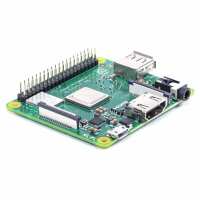
“Bought purely to run volumio with the IQaudio DigiAMP+. Worked straight out of the box, nice compact install with the Adafruit Pi Model A+ Case and lid with a little cutting and some standoff spacers for the lid. Spotify sees it as a device from the spotify app (and my other Volumio on a Pi B with IQaudio DAC+) and you can switch easily between the 2 either from Spotify or the Volumio web interface. Thanks Pi Hut. - J.W.”
“This was bought as a Christmas present for my son, who had put it on his 'list'. He loves it! However, as a bit of a technophobe, I found your website incomprehensible. I didn't even understand what it was I was ordering, I just added it to my basket. If I had understood a bit more, I might have also bought the case to put it in - although my son has since bought this for himself. Maybe make your website a bit less geeky for people like me, who haven't got a clue?!”
“The raspberry pi itself is a quality piece of tech and came really quickly after ordering. The only complaint I have is I ordered a micro usb power cable supposedly compatible with this model (which I’m sure it is) but the way the wire has been made means that you can’t have it plugged in whilst having a hdmi plugged in at the same time, so had to get another micro usb wire from Amazon. Apart from that everything was great thanks”
“Originally, I wanted to use the Pi3 A+ in gadget mode to use this as a webcam. However due to a design oversight in the Pi this is more complicated than I thought if not impossible. I hope they fix this with the Pi4 A+.”
“This is a Christmas present for my son, so it hasn't been used yet, but it looks fine and was well packaged and the delivery was quick. Thanks, Janice.”