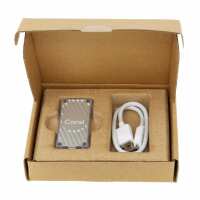
“If you're using a Raspberry Pi and Frigate with object detection then the Coral USB is a massive improvement. Without the USB my Raspberry Pi fan was extremely noisy and now it rarely needs to run. Object detection is a lot better too. I'd highly recommend it. For reference… I'm using a Pi 5 with 8GB of RAM.”
“Ordered this to speed up the AI functionality on my QNAP TS453BE NAS.
It was instantly recognised by my NAS, although only when I used my own usb cable(!).
The one supplied powers up the device, but it is not recognised. Other users have reported the same issue with the supplied USB cable.
It has made a difference processing a library of nearly 40,000 photos; not a lighting fast improvement, but for the price I'm happy.”
“I intend to use the USB Coral TPU with the Frigate security camera NVR software under Linux but am not ready for doing that. So I researched how to verify the operation of the Coral using Linux. There are many articles online as to how to do this - most are out of date, or just plain don't work. However I was able to create a Docker container based on Debian 9 and Python 3.5 that worked with a Google demo. The Google software for the Coral requires a Python version below v3.9. What I did was use the method given here:
https://www.jeffgeerling.com/blog/2023/testing-coral-tpu-accelerator-m2-or-pcie-docker
but with my own Docker container created using the Dockerfile given below . As mine is the USB Coral I replaced "--device /dev/apex_0:/dev/apex_0" with "--device /dev/usb:/dev/usb" in the method.
Dockerfile used:
FROM debian:9
WORKDIR /home/john
ENV HOME=/home/john
RUN cd ~
RUN echo "deb http://archive.debian.org/debian stretch main" > /etc/apt/sources.list
RUN echo "deb http://archive.debian.org/debian-security stretch/updates main" >> /etc/apt/sources.list
RUN apt-get update --allow-insecure-repositories
RUN apt-get install -y gnupg2 nano python3 pkg-config usbutils
RUN apt-get install -y python3-dev
RUN apt-get install -y python3-pil python3-numpy
RUN apt-get install -y apt-transport-https
RUN echo "deb https://packages.cloud.google.com/apt coral-edgetpu-stable main" \
| tee /etc/apt/sources.list.d/coral-edgetpu.list
RUN apt-get install -y curl git wget
RUN curl https://packages.cloud.google.com/apt/doc/apt-key.gpg | apt-key add -
RUN apt-get update --allow-insecure-repositories
RUN apt-get install -y edgetpu-examples
RUN apt-get install -y gasket-dkms
The output from the test software was:
---------------------------
Poecile atricapillus (Black-capped Chickadee)
Score : 0.441406
---------------------------
Poecile carolinensis (Carolina Chickadee)
Score : 0.292969
So I assume this shows the Coral is working.
The Coral was shipped from PiHut on the day of my order or the next, which was great.”