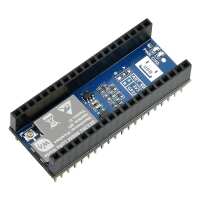
“Nice and simple for Meshtastic use:
1. Connect the aerial to the LoRa module and mount a Raspberry Pi Pico
2. Connect Pico to computer via USB.
3. Flash the Pico with correct Meshtastic firmware (https://meshtastic.org/downloads/
4. Configure and use the Meshtastic firmware directly via your browser (https://client.meshtastic.org/)
Alternatively, using AI for a custom LoRa network, eg ChatGPT,
Prompt your AI with a detailed description of your hardware setup, tell the AI to use MicroPython, and then describe what you want to achieve. Copy the code from the AI to your preferred IDE, eg Thonny or VSCode for upload to the Pico. Make use of the MicroPython SX1262 LoRa driver library. An iterative AI prompting process.”
“I'm an experienced software developer but I could not get this to work. This product should not be sold if the supporting libraries are not tested and up to date. Very disappionted.”
“I bought two of these to enable simple "pager" type communication between two Picos. As other reviewers have mentioned, the Waveshare documentation isn't that helpful (or at least it wasn't to me!) which as a complete novice is a bit of a barrier. However I found a GitHub repository that had drivers and example code (https://github.com/ehong-tl/micropySX126X) that worked, although I had to change the frequency. Once I found that, I was able to build on that working example code to do what I wanted to do, with help from AI at times.”
“Definitely works for meshtastic, and adds a node that others can speak to. I can't get the Meshtastic Client to connect to it over wifi though (and of course, it doesn't support bluetooth with the Pi yet). So, I could only use the UI over the serial port.
It does work well though!”