Login
Start Free Trial Are you a business? Click Here

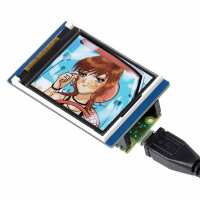
1.8" LCD Display for Raspberry Pi Pico Reviews

4.8 Rating 17 Reviews
Read The Pi Hut Reviews
Visit Product Page

Email:

contact@thepihut.com

This is a great little display. Using it is made easy by first viewing both the Waveshare and TonyG's tutorials. The only thing I don't like is the supplied font. I created a new one of my own, although again I was helped by TonyG's efforts. I found that a font based on a 6x12 pixel grid worked well. I used the display along with a Pico Zero Expansion board (SKU: 104152). I mounted the Pi Pico on one side using long pin sockets and then mounted the display on the other side using the long pins that extend through. This then gave access to all the GPIO pins for projects.
4 Helpful Report
Posted 2 years ago
Good little display. A little complicated to program, and the tutorial code isn't that helpful. But overall, it's alright!
Helpful Report
Posted 2 years ago
Excellent little screen that's pretty much plug and play. Have a look around the web and you'll find some great example code including how to display images using Micropython.
Helpful Report
Posted 2 years ago
Will look great in the LGB station
Helpful Report
Posted 3 years ago
Great little display, easy to get working, only downside is there are no options to mount this to anything (no holes). Ideally, i’d prefer the same without the pico connection so i can connect separately (which i could still do if i wanted). Overall, very happy with is little display.
1 Helpful Report
Posted 3 years ago
A+
Helpful Report
Posted 4 years ago
This is a great piece of kit at an impressively low price let down by the supporting documentation. Most of the examples will not run on my system because of missing software from the default pico version of python and I can find no clues about how to add it. Rather frustrating.
2 Helpful Report
Posted 4 years ago
Update to initial review - even better now. I’ve been in touch with Waveshare and they have updated their driver so that the origin is correctly at (0,0) = top-left and the opposite corner at (159,127). Full 160x128 pixels! I’ve published two tutorials on how to use the display which contain the new driver. You can find them here: WaveShare Pico LCD-1.8 Display Workout : 14 Steps (with Pictures) - Instructables and Simulated 7-Segment Numbers With Pico and Waveshare Display : 7 Steps - Instructables This is a really useful board and a great performer. Tony Goodhew
8 Helpful Report
Posted 4 years ago