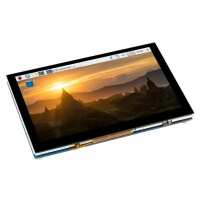
“Very clear picture. I am using this for developing an embedded app using PyQt and it just worked out of the box with the most recent Pi OS image, including the touch screen functionality. I like that the USB and network ports on the PI sit flush with the edge of the screen.
My one niggle is that the backlight brightness control doesn't really offer a huge change and the lowest brightness level is still quite bright. This can be fixed by changing the resistor on the back of the screen and instructions are provided on the wiki, but it is an odd default choice.”
“Nice display with good clarity for this resolution, no visible lag/tearing on videos.
Be wary you will need to change some settings on your OS before this will work, depending on your model and software. The wiki has all the info!
Comes with a few mounting posts which is handy. I needed a longer ribbon cable because my Rpi won't be mounted on the back and the included ones are *very* short so keep that in mind when ordering.”
“Works straight out of the box with my RPI 3b+ with decent build quality. As for the image quality, let's break it down 2 parts. Resolution is what you would expect from a 5" 800x480, which is not great, but acceptable. The downside is the black level, which is far from adequate, meaning everything looks washed out, with no contrast. There is an amoled version that connects via DSI and GPIO pins. That was a no go for my application as I need the GPIO pins for a hat and also feared burn-in. Waveshare does a 4.3" IPS version which is not available on Pi Hut. I've ordered it from China, will see how it compares.”
“I bought this as a more compact and cheaper alternative to the official 7in display to use in a project to build a touch-controlled Zynthian box. The DSI connector makes it easier to use with a hifiberry, which doesn't have the GPIO extension soldered in. For this purpose it is fine: it's just about large enough to avoid making too many mistakes when operating the Zynthian interface, but small enough to fit inside a project case for portability. I had to extend Zynthian's "bold" and "long" press durations to avoid triggering them accidentally when adjusting virtual controls by touch. If you're tempted to build a relatively cheap, compact Zynthian box, or similar, that is quite usable without wiring up physical encoders and switches, this display is worth considering.”
“Very well made. Once connected the RPi uses it without any input from me. The display is excellent - I wanted it to make a portable Pi.
However, if you want to revert to HDMI output you need to comment out the HDMI stuff in boot/config.txt then reboot (I never got the waveshare video switcher program to install/compile - something to do with a missing library)”