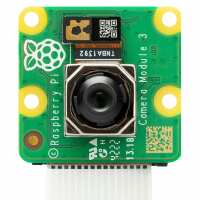
“The camera itself is excellent, although I am not a professional photographer and not even a much of a amateur one either. The pictures I see look just like the image I saw before I clicked the 'take a picture' button. That's good enough for me. I have never tried to make films.
HOWEVER I have to lay a ***major software deficiency **** at the feet of Raspberry Pi. The module is square and has the camera's ribbon cable exiting from the south side. However, my preferred case for the RPi has a place for the camera module, but (sadly) it leaves the camera upside down. Raspberry Pi requires that the ribbon cable exit south and my chosen case requires that it exits north. So all my photographs are upside down!
When I buy a monitor I can correct this. I can tell the Rpi its orientation using "Preferences >> Screen configuration". I can then mount my monitor as a photo frame in landscape or portraint orientation. However, there is no such easy fix for the camera module. In some deeply hidden documentation I eventually found references to 'hflip', 'vflip' and 'orientation 180'. These sound *exactly* what I want, but I totally lack the knowledge where to type them to correct my camera's upside-downness so that it is right every time I reboot.
I want Preferences to have a 'Camera Configuration' that allows me to use just a few mouse clicks to cater for the camer's orientation. Anything less is a gross oversight. It should have been there from the very first model (well before Model 3, I believe) to allow a camera.”
“Great little product, arrived speedily and well packed as always. Nice to give my little computer project some 'eyes'.
Came with the correct cable for the Raspberry Pi 5.
I splurged on a little perspex holder, just to give the camera something to sit on & position, but the ribbon cable is so inflexible that it makes trying to get the camera to sit flat impossible, even with the stand. Can we have a more flexible connecting cable option please? Even a bridging cable between the two current cable terminals,
Short of screwing it to a mini tripod, I can't think of another way to solve this annoying problem.
Oh, and I'd been reading the 'libcamera' commands but they don't seem to be recognised on my Pi 5. A little forum digging suggests that they have moved to a 'rpicam' command structure, so be warned.”