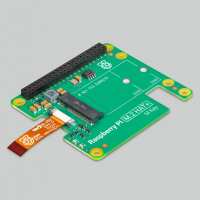
“Easy install and obviously a perfect fit.
Super fast shipping. Super easy to set up using ChatGPT to walk me through the entire process. Everything was EXACTLY as expected by ChatGPT. Added the additional hardware, Active Cooler, SSD. It runs completely silent....so far I've not put the CPU under enough load to switch the fan on. It'll be used to run my Halloween show, fusing radar data with camera video data to determine where people are and where they are actually looking and sending 'scene' based commands to each prop to run the 'show'. Busy configuring the large number of ESP32 controllers for wifi comms back to the Pi5. And busy getting ChatGPT to programme the LCD displays to act as eyes to form the show entry point....with the Pi5 deciding where each eye should be focussed. Lots of moving parts, but really happy the Pi5 will be managing the show for me.”
“Bit tricky to get onto the GPIO pins, even trickier to remove. Definitely recommend seating the mini ribbon before attaching the hat contrary to instruction. But cannot complain generally - fits nicely over an active cooler, and functions as expected.”
“pretty straight forward, got fitted, nicely, no delays no thinking required, just the gpio pins idea is completely missing here, this could be done better OOB way without workarounds”
“It works well - and installation was pretty easy. My only reservation was that it wasn't clear to me when I bought it that it was not fully compatible with the standard Raspberry Pi case, with its fan. First, the HAT sticks up into the space where the fan goes, so you can't use the fan. And second, you can't therefore close the case. And third, at least for me, the Pi + HAT assembly fits awkwardly into the base of the case. So I had to buy another minimal case (the layer case), and the active cooker, to finish the upgrade. Having done so, it's a nice setup.”