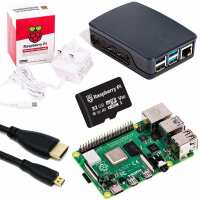
“Realy works well, I bought this version because it comes with all the extras you may need, power supply, HDMI cable, enclosure, and a 16gb SD card with OS preloaded.
I became interested because I saw the Raspberry PI Beginners Guide magazine in my local supermarket at the start of the coronavirus outbreak, and realised that I could very soon become board out of my scull.
Whilst this review is about the hardware, the magazine it's self is a great resource and made the setup very easy.
I originally got started using an old 24 inch TV with HDMI port, microsoft wireless/mouse, inserted the w/m receiver (which saves a USB slot) and the sd card and switched it on, followed the on screen instructions and away I went. I initially got the screen resolution set up wrong, and whilst it was still usable, things like that irritate me. After exploring the options available from the preference settings and going onto the recommended forums, I decided to bite the bullet and reformat the SD card.
Fortunately the ISO file was on its own partition, so I was able to re install the OS from scrap getting the screen display setting correct this time.
So now its up and running, and its working great so no criticisms there. This is a fun bit of technology with a really low entry price, and if like me, you want to know what the differences are between Linux and Windows and say Visual Basic and Python, this really is a great resource without having to compromise your familiar environment.
A final observation, my raspberry is now permanently "on" and sat somewhere up in my loft connected to my network and I now access the raspberry remotely via my laptop from anywhere with in my house, so I can play anytime. Easy Peasy.”
“I have had PIs for quite some time and my media server popped it and I had to replace one so I ordered this kit. Seems to work as well as the last one.
The kit is of high quality and was delivered complete.
A couple of points though.
1. The PI would not boot with the SD card it came with. Turns out the card was formatted in 2015 and did not have an up to date OS that was required to work with the Pi4. I installed the lastest Raspbian on the card and was ok to go. This is ok for me as I knew what I was doing but as a started kit to some new recruit then this would be daunting.
2. The Pi runs hot. There was no noticeable temperature off my previous Pi2 but this one is quite warm - Im keeping an eye on it as I run my Pi 24/7 in my house.
All in all its a handy product and sits on its own whil I remote in from my Mac and my Windows machines.”
“Wanted to create a Pi Hole solution at home with a Raspberry Pi Zero. But I opted to go for the Pi 4 and now I'm doing all kinds of other stuff with it as well, such as monitoring my smart meter and controlling my home domotics. Once you get started on Raspberry Pi, you keep thinking of new stuff to do with it....”
“This is our fourth Raspberry Pi, great hooked up to an old monitor for kids school work.
Easy to overheat with certain web pages, so we added a Fan Shim and drilled out the case with a 30mm hole saw to solve this.”
“Rapid arrival, easy to set up. All the functionality of a desktop. Initially connected it to a TV (HDMI) but wanted to connect to a monitor (DVI). Found it quite hard to source the correct cable but it's sorted now. One of the HDMI ports gave out early on. Did wonder if it got overheated, owing to the kids using Minecraft a lot. By the following day, that port was working again. Have my 12 year old learning Python now!”