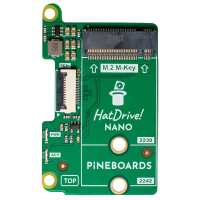
“The HatDrive! Nano is just all kinds of awesome. It's relatively idiot proof and when it comes to installing your OS, just boot it up from an SD card, run rpi-imager and it will allow you to flash your choice of OS onto your sparkly new NVMe SSD, power it all down, remove the SD card & it should autodetect & boot straight into the SSD . Rebooting it will take a couple of seconds, rather than a minute on my old SD card. The only gotcha is that if you just have a standard Pi5 case (with the cooler fan in the lid) you will have to buy an Active Cooler as well. Click out the fan & shroud from your case & fit the Active Cooler before you install the HatDrive! Nano. You'll need to slot in & attach the SSD before you attach the ribbon cable, as it screws in from underneath. Lastly, screw it into the pillar supports. Search online and you'll find loads of guides, TomsHardware was very useful to me. I enabled the Gen3 setting in raspi-config, but my SSD was a Samsung Gen4 that I got cheap from Amazon. Please believe me when I say that the speed increase is astronomical. Words fail me on just how good it is. When you buy one, you'll regret not getting it sooner.
NOTE: the bottom screws that hold the support pillars in place need to be slotted through the holes in the bottom of the case, as they are just too long to fit only on the Pi5 board itself.”