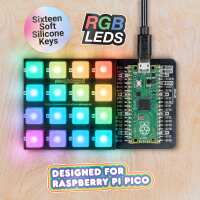
“I enjoyed making a small case out of an old WD external hard drive. I have it as a secondary keyboard but would love to use this as a beat pad one day.”
“Very good base for pico. Easy to use and mount pico onto. Lights are bright and it works well. Buttons work well but are slightly uncomfortable however it is very good for the price.”
“I first bought one of these when they came out, and had been using the Pimoroni-baked version of MicroPython to work with it. It is a neat little product, and I decided (during a discount period) to get another couple of them.
For a person of a certain age (with failing eyesight and manual dexterity issues) assembly is still a piece of cake (OK, I cheated and used tweezers to hold the retaining nuts in place!)
I have switched to using C/C++ and the Pico SDK for my code, using a PicoW rather than a Pico, as I use the keypad as a 'super light-switch' for my Tasmota-based lights and power sockets, using MQTT.
Because the unused GPIO pins are accessible (by soldering headers or sockets to the board (again, not super-difficult), I was also able to add extra functionality by attached a small OLED display as well.
I could also fit a Pico LiPo shim, so the whole thing is now battery-powered, and can easily be moved from room to room (although I plan to make a few more.
I found the supporting code in MicroPython easy to use, and the C/C++ stuff equally straightforward.
When I looked at the schematic and datasheet for the TCA chip, I realised that GPIO#3 was connected to the INT for that chip. By setting this as an input (pull-up enabled) I can now read it and see if I then need to read the button values, which means not needing to scan for changes unless there are any.
What I need now is a case to put it in - sadly, unlike the Pi, cases for the Pico aren't as readily available, largely I suspect, because while the Pico form factor is fixed, you can plug it in and connect it to just about anything!”