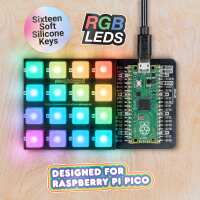
“Great hardware but needs a bit more documentation/support. The getting started guide does what it HAS to, but nothing more. Had to switch from Pimoroni's MicroPython firmware to CircuitPython in order to use as HID keyboard.”
“Excellent bit of hardware, as usual, from Pimoroni and great to muck about with. The getting started guide does its job but documentation is otherwise sadly lacking. Ended up relying on sample code on GitHub by qbalsdon, martinohanlon, dottxado, pixlwave and others.”
“The actual unit is very good quality, along with the very smart packaging.
It was very easy to assemble, as we also 3d printed the case to go with the base.
We had no missing parts, I love this little project, I f your new to soldering I would suggest you go for the Pico complete with headers.
One downside to this project I found, the software side to be quite confusing, even though instructions was on the rear of the packet its unclear what you have to do.
The link takes you to a library folders with the RGB pad as just one of the folders, so my project is still incomplete and ongoing.
From a pico Noob”
Ahoy Lee! Have you found our Getting Started with Raspberry Pi Pico tutorial? https://learn.pimoroni.com/tutorial/hel/getting-started-with-pico ? Alternatively, if you're interested in going down the CircuitPython/HID route, you might find this forum thread helpful?: https://forums.pimoroni.com/t/pico-rgb-keypad-base-as-a-usb-hid-device-solved/16224/.
“Really like it - looks great, is well made and the keypad works well. Just wish there were HID drivers for it in Micropython, rather than having to use CircuitPython. Not really a fault of the device, more of the strange sofware situation the RP2040 is in at the moment where it's a bit of a mish-mash of C/C++/MicroPython and CircuitPython depending on what you're wanting to achieve.”
“It's promising ...
Looks and feels great, but it's proving to be a bit more tricky to use than I'd expected. I'd wanted to use it as a blinky colourful macro keypad, but the Pimironi example Micropython code doesn't have USB HID drivers for it. I've had some success with CircuitPython, but having issues getting the LEDs working as I'd like. It's so nearly excellent, just lacking software support at the moment.”