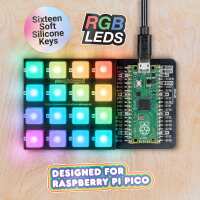
“The device works quite well. Assembly is very simple and the c/c++ Libraries work very well with no issues. One thing i did discover is that you should not set the brightness of the led's any higher than the brightness in the example as they will get very hot. The buttons when pressed are quite tactile and i never have an issue with the buttons not working.
I have used this device to make a simple 16 key RGB macro keyboard.”
“Beautifully crafted and easy to assemble, it’s also very fun to experiment with and use. The leds are truly beautiful, the buttons are silent and squishy, and you can start finding a lot of code examples on C, MicroPython and CircuitPython. Check my video with a demo of a macro pad https://twitter.com/dottxado/status/1360658044330377226”
“Oodles of fun and possibilities. As of today (mid-Feb 2021) slightly let down by no USB HID support in Micropython on the Pico. That makes Pimoroni's choice of library a little perplexing: why not just go for CircuitPython where USB HID is already available. Ahh well. I'm sure like all Pi-things it'll get resolved over time.”
“I love this. The colours are bright and clear, and very tactile, and there are plenty of potential applications for it if you need an excuse to get hands on with the Pico.”
“Easy to put together, the colours are good and the keys are very soft. This would be a great project for children who are in primary or early secondary.”
“Cool addition to the Raspberry pi pico. Important to remember to download the setup files from Pimorini when using with the pico to ensure you have the correct setup for usage. The demo python device in my case was useful for getting started programming. I’ve used this for a lighting setup for online video conferencing already!”