
Login
Start Free Trial Are you a business? Click Here

Flipper Big Button Remote Control for Sky, Virgin, & Digital TV Reviews

4.5 Rating 367 Reviews
Read AlzProducts Reviews

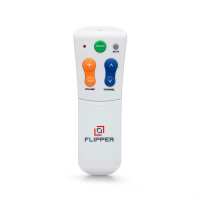
The Flipper Big Button Remote Control is AlzProduct's recommended remote control. We believe it to be the best simple television remote control available in the UK.Promotes confident independent use: Features just 6 large tactile buttons (On/Off, Channel Up/Down, Volume Up/Down, Mute) designed to provide intuitive control without overwhelming complexity or confusion.Helps users stay on familiar channels: Favourites function allows programming of 2-25 preferred channels, designed to minimise frustration by helping users easily cycle through only the content they recognise and enjoy.Simplifies multi-device control: Dual-function capability operates both TV and set-top box with one remote, featuring nearly 1000 pre-programmed codes for quick setup with Sky, Virgin, Freeview, and major brands.Designed to maintain consistent settings: Lock feature helps prevent accidental reprogramming, providing peace of mind for families while supporting user independence in daily TV viewing routines.Offers risk-free compatibility assurance: Functions with most UK TVs and set-top boxes, backed by AlzProducts' Compatibility Guarantee with full refund (including delivery) if deemed incompatible after technical support.Key Features6-button simplified design: On/Off, Channel Up/Down, Volume Up/Down, MuteFavourites function: Program 2-25 channels for easy cyclingDual-function control: Operates TV and set-top box with one remoteNearly 1000 pre-programmed codes for major UK TV and set-top box brandsLock feature prevents accidental reprogrammingUK Compatibility Guarantee with full refund if incompatibleDual-Function FeatureThe Dual-Function feature allows you to turn both your television and Freeview/Sky/Virgin boxes on/off using just the Flipper.This removes the need for 2 remote controls and can help reduce confusion.Favourites FeatureOne of the best features of the Flipper remote control is the ability to set-up a favourites list:Choose from between 2-25 channels on your television or set-top box (including Sky and Virgin)Simply cycle through these channels, missing all other channels in the processCan reduce digital television, Freeview, Sky, or Virgin, into fewer and more manageable channelsA common problem for many of our customers is that they accidentally end up on a channel they do not recognise and cannot find their way back to familiar channels, the favourites feature eliminates this issue.CompatibilityThe Flipper big button universal remote has the highest compatibility out of all universal remote controls that we've used in the UK, and is compatible with the following types of devices:Televisions (including built-in Freeview)Television and set-top box combinationsCompatible with Virgin, Sky and nearly all other set-top boxesA set-top box is any external device plugged into your television that provides your television channels, such as Freeview, YouView, or a Sky or Virgin box.AlzProducts Compatibility GuaranteeThe Flipper Big Button Remote Control is protected by our UK Compatibility Guarantee.This means that if, after receiving technical support from us, your remote control is deemed as incompatible with your television or set-top box, we will offer you a full refund for your order, including the original delivery charge.Flipper Remote CodesA complete list of programming codes is included in your Flipper instructions. You can also download a PDF file containing the full list of TV programming codes in the Downloads & Instructions section of the Specifications table further down this product page.FAQsWhat if my brand of TV/STB isn't listed in the programming code list?Programming codes are used as the quickest method to program the Flipper. If your STB/TV brand isn't included in the list it does not mean the Flipper will be incompatible, it simply means that you will have to manually program your Flipper. 

Visit Product Page

Phone:

024 7642 2224

Email:

support@alzproducts.co.uk

Location:

Unit 2, 68 Bayton Road, Exhall,
Unit 2, 68 Bayton Road, Exhall
Coventry
CV7 9EJ

We thought this was the answer to the problems Dad (who is 91, suffering from Dementia), has with using a TV handset. The on off writing on the green button is too small so he couldn't read it! Also when the handset switches the TV on it doesn't list all the channels, so he can't see what is on, on each channel. The buttons are sensitive so if he leaves his finger on the Chanel arrows for too long he finds himself going up to channel 400 and above, then he can't figure out how to get back to channel 1.
Helpful Report
We're sorry to hear that our customer has had some issues with the Flipper. Unfortunately being able to view/list the channels isn't something that the Flipper, or any similar simple remote control, is able to do, due to the lack of buttons. There would need to be an additional 4-5 buttons at least to be able to navigate a menu. There are some basic remote controls that allow this but not the most simplest remotes such as the Flipper. Regarding the situation where you can end up on an obscure channel number, there aren't any easy fixes for this but a few ideas that may help; the favourites function may be suitable, this means you could program up to 25 channels to cycle through; you can also use the 0-9 keypad on the Flipper to change the channel back to channel 1, or you could keep an alternative remote nearby to do this as well. Although we appreciate none of these solutions are perfect we hope that's provided some further information for you. Kind regards,
Excellent piece of kit - does exactly what it says it does - read the instructions - don't think you know how to programme!! - follow what it says - it works.
Helpful Report
Brought this for my 91 year old mother-in-law who suffers with dementia. She was getting very confused with two controllers, [tv and sky], and gradually, despite our best efforts, she became unable to control the tv/sky with anything. So we bought a flipper. Admittedly it did take a bit of perseverance and fiddling to programme everything to work, but eventually we got it. We've set it up so that it controls the tv and Sky Q box, turns the tv on and off, but WILL NOT TURN THE SKY Q BOX OFF [really important]. So now, she can turn the TV on and off with the big green button, she changes the channel to any of 30 pre set favourite stations, and can turn it up or down. And she does it quite happily. Only downside that we can see is that you have to be careful NOT to programme any film channels, because if one happens to be PIN protected she can't enter any pin number, so we kept it simple. But it works for her.
Helpful Report
Author didn't leave any comments.
Helpful Report
Bought this for my 88 year old mother who has dementia, she was having real trouble using the Sky remote so was pinning my hopes on this being the answer..... and it was! Took me about an hour to set it all up including setting up the 30 favourite channels but so far so good. Only had one glitch where the sky box and tv were turning on and off at different times, but this seems ok now. If I did have any issues I had an email from the company to say I could call and they would be able to help me with it so that was reassuring that if I got in a pickle someone was there to help.
Helpful Report
Excellent product, mum loves it that she can now control TV with one remote, doesn't have to keep phoning family to go and sort her TV out
Helpful Report
brilliant wish i'd bought it sooner. my mother has dementia & alzehimers and was so confused with 2 virgin boxes with millions of different buttons on both. SO now we have the flipper big button. Easy to tune in the on/off + volume, A little harder to tune in channels, but alas once tuned in its sooooooo much more useable for a dementia patient. delivery great.
Helpful Report
Excellent product, I have a 91 year old mother with memory problems and this has sorted out the confusion of two remotes and loads of tiny buttons. Best product we have got for her so far.
Helpful Report

