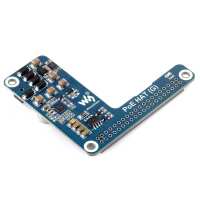
“Easy to install and works perfectly.
Just remeber that the Pi 5 has a power button.
The PoE HAT (G) fits nicely inside the standard Raspberry Pi 5 Case.”
“Worked out of the box. Plenty of standoffs screws etc which makes up for complete lack of instructions/guide. My setup has the poe hat above the active cooler and an m.2 board below the Pi5.”
“To get it to work I had to use the usb current change to the pis config. It can be found on the manufacturer’s website. Other than that this works great.”
“Great product. It requires to add a line to the eeprom config if you want to use USB drive boot so that it removes a power limitation if no usb-c is connected. If you use Home Assistant OS it’s easier to flash raspberry pi OS to an SD card and update it that way. It boots correctly over PoE and usb boot now.”
“Unfortunately, my experience with the Waveshare PoE HAT (G) for Raspberry Pi 5 was very poor.
The HAT was installed correctly on a Raspberry Pi 5, connected via both the 4-pin PoE connector and the 40-pin GPIO header. The red LED on the HAT lights up, but the Raspberry Pi does not receive power via PoE.
What I tested:
Multiple Ethernet cables with different RJ45 connectors
Two different PoE+ (802.3af/at) switches
Other PoE devices work fine on the same switches
When connected to a PoE switch, only the LAN link LED is active; the PoE indicator never turns on. As soon as the USB-C power supply is unplugged, the Raspberry Pi immediately powers off. PoE power is clearly not being delivered.
After extensive troubleshooting, the result was always the same. The unit appears to be defective.
Support from The Pi Hut was responsive and professional and offered an RMA, but the product itself did not work as advertised. Based on this experience, I cannot recommend this PoE HAT.”
“I purchased this hat so I could use less cables. Simple to fit and came with all hardware to complete the task. It’s always nice when that extra bit of thought is used by a manufacturer and includes everything. Small foot print, wuick and easy to install. Works great. 5/5*”