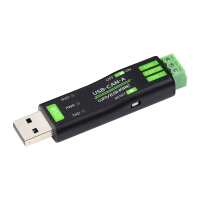
“ Awesome bit of kit that deos exactly what I need! It would be good if they could make the USB smaller so it's wasier to package neatly”
“ It works fine once you realise it is speaking a proprietary binary protocol! For anyone who comes next:
#!/usr/bin/env python3
import argparse
import serial
import struct
import sys
import time
from datetime import datetime
# Defaults from the C code
DEFAULT_UART_BAUD = 2_000_000
CANUSB_INJECT_SLEEP_GAP_DEFAULT = 200 # ms
# -----------------------
# Speed code translation
# -----------------------
SPEED_MAP = {
1_000_000: 0x01,
800_000: 0x02,
500_000: 0x03,
400_000: 0x04,
250_000: 0x05,
200_000: 0x06,
125_000: 0x07,
100_000: 0x08,
50_000: 0x09,
20_000: 0x0A,
10_000: 0x0B,
5_000: 0x0C,
}
MODE_NORMAL = 0x00
MODE_LOOPBACK = 0x01
MODE_SILENT = 0x02
MODE_LOOPBACK_SILENT = 0x03
FRAME_STANDARD = 0x01
FRAME_EXTENDED = 0x02 # (not really supported by this short demo format)
def checksum(buf):
"""Sum of bytes & 0xFF (like C code)."""
return sum(buf) & 0xFF
def build_settings_frame(speed_code, mode=MODE_NORMAL, frame_type=FRAME_STANDARD):
"""
20-byte command frame:
0: 0xAA
1: 0x55
2: 0x12
3: speed_code
4: frame_type (1=std,2=ext)
5..8: filter id (ignored -> 0)
9..12: mask id (ignored -> 0)
13: mode
14: 0x01
15..18: 0
19: checksum(data[2..18])
"""
frame = bytearray(20)
frame[0] = 0xAA
frame[1] = 0x55
frame[2] = 0x12
frame[3] = speed_code
frame[4] = frame_type
frame[5:13] = b"\x00" * 8
frame[13] = mode
frame[14] = 0x01
frame[15:19] = b"\x00" * 4
frame[19] = checksum(frame[2:19])
return bytes(frame)
def frame_is_complete(buf):
"""
Reproduces the C logic:
- If first byte != 0xAA, treat as junk (complete to resync)
- Command frames: 0xAA 0x55 ... always 20 bytes
- Data frames: 0xAA 0xC? DLC in low nibble, total len = DLC + 5
"""
if not buf:
return False, 0
# If doesn't start with 0xAA, we consider that a "frame" to skip
if buf[0] != 0xAA:
return True, 1
if len(buf) < 2:
return False, 0
b1 = buf[1]
# Command frame
if b1 == 0x55:
if len(buf) >= 20:
return True, 20
return False, 0
# Data frame: high nibble is 0xC
if (b1 >> 4) == 0xC:
dlc = b1 & 0x0F
need = 1 + 1 + 2 + dlc + 1 # 0xAA + info + 2-byte ID + data + 0x55
if len(buf) >= need:
return True, need
return False, 0
# Unknown ? treat as single byte to skip
return True, 1
def parse_data_frame(frame):
"""
C prints:
Frame ID: %02x%02x, Data: ...
Layout:
0: 0xAA
1: 0xC? (upper nibble 0xC, low nibble DLC)
2: ID LSB
3: ID MSB
4..N-2: DATA
N-1: 0x55
"""
info = frame[1]
dlc = info & 0x0F
id_lsb = frame[2]
id_msb = frame[3]
can_id = (id_msb = 6 and frame[0] == 0xAA and ((frame[1] >> 4) == 0xC):
can_id, dlc, data = parse_data_frame(frame)
ts = time.time()
print(f"{ts:.6f} ID: 0x{can_id:04X} DLC: {dlc} DATA: {' '.join(f'{b:02X}' for b in data)}")
else:
# Unknown / sync loss ? print if you want to debug
print("Unknown:", frame.hex())
pass
def send_data_frame(ser, can_id, data):
"""
Matches send_data_frame() in C.
Only handles 11-bit IDs (2-byte ID field).
"""
if not (0 0:
send_data_frame(ser, can_id, data)
remaining -= 1
time.sleep(gap_s)
else:
# -------- DUMP MODE ----------
print("Dumping frames? (Ctrl+C to stop)")
dump_frames(ser)
except KeyboardInterrupt:
pass
finally:
ser.close()
if __name__ == "__main__":
main()”
“ Easy to order. Quick delivery. Well packed. Will order again.”
“ A simple device - appears as a USB Serial port and prints received CAN frames has hex strings. You can send it hex strings back to configure some CAN settings, or to send frames.
One thing to be aware of - it contains an actual USB to UART chip, not just a microcontroller acting as a USB Device. This means the baud rate for the USB Serial interface is very important because if it is wrong the microcontroller won't be able to communicate with the USB Serial chip. Unfortunately the default baud rate is 2,000,000 baud, which is not supported by the default USB Serial driver on macOS. I had to plug the USB to CAN Adapter into a Raspberry Pi instead.”
“ The adapter itself is very easy to use. It comes with enough documentation and a C example. The data itself arrives in serial format (It's a CAN to Serial converter), so it (obviously) won't work with SocketCAN. There are no included Python code examples, however, it's incredibly easy to write something with PySerial with the documentation Waveshare provides.”