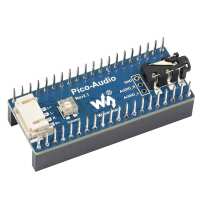
“Didn't work for me. Not sure if it was the Pico Audio or the speakers. Returned for a refund.
Pity - it is a nice compact, modular design as most Waveshare products are.”
“The product arrived promptly and is as described. Unfortunately the version 2.1 is not as well supported by example software as the original version.”
“It's ok, but the volume control is a bit small and could be obscured depending on how you stack the Pico.
Additionally, the sample software is extremely limited and doesn't give much to build on.”
“Impressive speakers - well made nice to be able to plug them straight into the pico-audio. The sound quality is not bad - don't expect super duper quality sound from small speakers.
I plugged the HAT into a Pico and then plugged this into a Maker Pico board, because it has an SD card. I used CircuitPython to do my testing.
The examples to generate tones work, no problem. It isn't possible to plug in headphones when using with the Maker-Pico board - there's a connector that gets in the way.
MP3 playback - using standard 192Kbps MP3 music I noticed the sound of a galloping horse whilst the music was playing. The CircuitPython MP3Decoder I think was at fault - it couldn't handle it. However, I reduced the MP3 bitrate to 11Khz and they played ok.
WAV files played just fine - although the recommendation is to reduce the bitrate again, I found my unchanged WAVs worked anyway. Note. I generated the WAVs from MP3 using Audacity. There you can set the bitrate and sample size if you want to.
I don't think any of the issues above were inherent in the Pico-Audio HAT.”
“This board works a treat. At the time of writing the Raspberry Pi cut of MicroPython didn't support MP3 playing, but it works perfectly with CircuitPython with a couple of pin changes in the software. Use this declaration: audio = audiobusio.I2SOut(board.GP27, board.GP28, board.GP26)”
“Neat design to connect directly to pico but unfortunately there don't seem to be any helpful instructions for setting up. A link on the waveshare site led to a wiki but it was still unclear how to approach the setup - I2S seems to be part of the answer but haven't been able to figure this out from info available.”
“great, except they chose to use the 3 ADC pins for the audio which is a shame because my plan involved a potentiometer. but it's a good board, easy to use with CircuitPython and the speakers are good too”