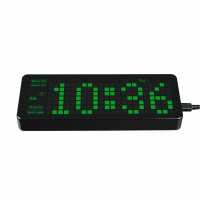
“The Good: it works! The timekeeping is accurate. The product is well-made and fits together nicely. It's nice and large - easy to read and there's an auto-brightness feature to save your eyes. The optional alarm is loud enough to alert you but not too loud.
The Bad: nothing major, but the Waveshare docs imply that you need to cross-compile the source and then upload the resulting binary. Not so! Just find the Pico-Clock_green.uf2 in the build folder and flash to the RaspberryPico. I wasted an hour unsuccessfully trying cross-compile on 2 different machines when I noticed the aforementioned uf2 file... The "lock" button on the back is just the (backup) battery cover.
Overall, a good buy.”
“I loaded the demo .uf2 file into a pico and plugged it into the back of the clock… and wham: it just worked. A little fiddly setting the time and so on, but it is flawless when you follow the instructions.
Next to try modifying it… pity it only seems to have C/C++ examples though, there is no sign of any MicroPython in spite of the description stating otherwise both here and on the Waveshare Wiki! I'm probably being blind.
All in all it's a very elegant retro-looking timepiece… and for the price it's amazing!”