“Really pleased with my order from The Pi Hut. The items arrived promptly, were well packaged, and everything was exactly as described. The quality of the products was excellent and they were ideal for what I needed.
The ordering process was straightforward, and I was particularly impressed by the range of components and technology available. I’ll definitely be using The Pi Hut again for future projects and would happily recommend them to anyone looking for reliable electronics and Raspberry Pi-related equipment.
5/5 — great products, reliable service and a company I’d happily buy from again.”
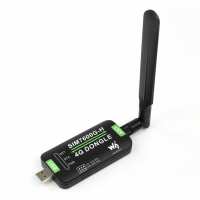
“Nice bit of kit for getting LTE/3G/2G cellular data access on a Pi or other device. I'm using it for remote telemetry/monitoring on a Pi based logger system.
Needs a bit of fiddling to get set up on R-Pi, and I initially went down a rabbit of dead-ends following outdated setup guides that don't apply to Debian Bookworm or Trixie with different modem/network manager tools. These actually make it fairly easy to configure and run the dongle as if it were a network adapter.
The inclusion of GNSS/GPS on the modem module is a bonus, though that requires a separate antenna and uFL adapter cable.
Also watch out for power brownouts when plugging this in to a running Pi - it seems to draw a fairly large surge current on hot-plug, so best to power up the Pi after plugging in this modem.”
“Used one of these with a Pi 3A+ to make a battery powered system sending automated messages over PMR radios using cloud based voice synthesis in a slightly rural situation. Found reception/reliability excellent. It's very obviously an "industrial/enthusiast" device not a "consumer" one and I mean that in a positive way. I intend to explore using it with microcontrollers as well.
Be aware when configured as an RNDIS device for a Raspberry Pi/Raspbian I found it didn't work with Network Manager's automatic setting of DNS servers. IP connectivity came up but DNS would be set then unset shortly after. To fix this I disabled management of DNS by Network Manager and set them manually to the Google ones.
Here's what I did...
sudo nano /etc/NetworkManager/NetworkManager.conf
And add this to the [main] section:
dns=none
rc-manager=unmanaged
sudo nano /etc/resolv.conf
Add...
nameserver 8.8.8.8
nameserver 8.8.4.4
...which worked as of October 2025.”