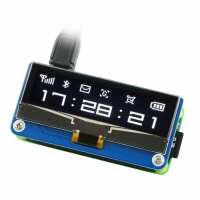
“Excellent product once it is working, though the Waveshare documentation for setting it up on th Pi is very convoluted. It relates to lots of different products & took me several hours to get it working as a result. One of the reviewers suggested different setup software but there were insufficient details”
“A great display unfortunately let down a little by its confusing examples that don't run out-of-the-box.
While in retrospect it does somewhat clearly state on the Waveshare wiki (https://www.waveshare.com/wiki/2.23inch_OLED_HAT) that you have to "Take SPI codes as example" [sic] it's confusing to a novice that only the Raspberry Pi 'bcm2835' example works out-of-the-box but for the 'python' one you're expected to use the datasheet to change the source code's defined SPI pin numbers?
That said, the examples also require that to be run with root/sudo permissions which is not exactly ideal. I found that Adafruit has written an excellent alternative library for the SSD1305 display controller that supports both I2C and the 'native' SPI the Waveshare module uses. An SPI-specific example can be found here, with the Waveshare SPI pin modifications:
spi = board.SPI()
oled_cs = digitalio.DigitalInOut(board.D8)
oled_dc = digitalio.DigitalInOut(board.D24)
oled_reset = digitalio.DigitalInOut(board.D25)
oled = adafruit_ssd1305.SSD1305_SPI(WIDTH, HEIGHT, spi, oled_dc, oled_reset, oled_cs)
https://github.com/adafruit/Adafruit_CircuitPython_SSD1305/blob/main/examples/ssd1305_pillow_demo.py”
“A great display unfortunately let down a little by its confusing examples that don't run out-of-the-box.
While in retrospect it does somewhat clearly state on the Waveshare wiki (https://www.waveshare.com/wiki/2.23inch_OLED_HAT) that you have to "Take SPI codes as example" [sic] it's confusing to a novice that only the Raspberry Pi 'bcm2835' example works out-of-the-box but for the 'python' one you're expected to use the datasheet to change the source code's defined SPI pin numbers?
That said, the examples also require that to be run with root/sudo permissions which is not exactly ideal. I found that Adafruit has written an excellent alternative library for the SSD1305 display controller that supports both I2C and the 'native' SPI the Waveshare module uses. An SPI-specific example can be found here, with the Waveshare SPI pin modifications:
spi = board.SPI()
oled_cs = digitalio.DigitalInOut(board.D8)
oled_dc = digitalio.DigitalInOut(board.D24)
oled_reset = digitalio.DigitalInOut(board.D25)
oled = adafruit_ssd1305.SSD1305_SPI(WIDTH, HEIGHT, spi, oled_dc, oled_reset, oled_cs)
https://github.com/adafruit/Adafruit_CircuitPython_SSD1305/blob/main/examples/ssd1305_pillow_demo.py”
“Fantastic detail and great addition. I'm using mine to display my current public I.P address so I can have it whitelisted for work and update it each time it changes.”
“Nice module, but please keep in mind, there is no framebuffer driver for Linux.
There is fb_ssd1305 driver in staging, but to run this, a device tree overlay file is needed, which does not exist.”