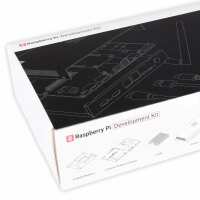
“I had been thinking about buying a Raspberry Pi5 since they were launched and finally took the plunge. I do prefer using an SSD with my pi’s and like the SSD to be contained within the same enclosure as the Pi. As I have a thing that all connections such as USB, HDMI, sound and power should be on the rear of the enclosure I was again having to look at designing my own case for a Raspberry Pi 5 4GB (SKU: SC1111) using a Multifunctional Adaptor for Raspberry Pi 5 (SKU: WAV-27009) and a Raspberry Pi M.2 HAT+ (SKU: SC1166) to accommodate an SSD. Also, I would need to have considered power AND cooling. As I don’t have a 3-D printer it was all getting to be a such a palaver and I was losing interest very quickly.
Luckily the Raspberry Pi Compute Module 5 Development Kit (SKU: SC1750) became available and along with a Raspberry Pi SSD (SKU: SC1439) provided everything I needed including the case, compute module, IO Board, power unit, passive cooler and cables. The only thing I needed to purchase locally was a CR2032 lithium cell battery for the RTC. This is a carrier restriction imposed on the PiHut but was not an issue as they are easily available.
On opening the case it was discovered that the IO board was already mounted saving me that task. I fitted the SSD easily into its slot followed by pushing home the compute module into its sockets. As mounting kit is not supplied, I am assuming that it will stay in place. A mounting kit is provided for use with the “Raspberry Pi CM5 passive cooler” but as I am planning to use the inbuilt fan it cannot be fitted.
I think I was wise to leave installing the Aerial until the end as it would have been slightly in the way for inserting the SSD. Worth noting that as the compute module is not secured in place the aerial connector should be plugged into the compute module before the module is mounted into the IO Board.
The good points are that all the cables are to the rear with the power button easily accessible on the front of the case. A downside is that once the case is screwed shut (four cross-head screws) there is no access to the 40 pin IO header. Connection to these would be possible via a 40-way ribbon cable but a slot has not been provided in the case to allow this to happen so case modification would be needed.
With an HDMI monitor, keyboard, mouse, ethernet network connected it was time to switch on. This was my first venture into using a compute module and I was fully expecting to utilise the boot loader to install Bookworm onto my SSD so I waited and waited but alas nothing happened it just stayed on the initial boot loader screen. On contacting the very helpful Billie at PiHut I was informed that the OS needed to be loaded by setting a jumper (J11) on the IO Board, connecting the power socket on the I/O Board to a PC (or Rasp Pi) using the (provided) USB-C to USBA cable and installing Windows Installer software. This detail was not provided in the box and I feel that this would be an improvement. However, the link Billie provided: https://www.raspberrypi.com/documentation/computers/compute-module.html#flash-compute-module-emmc allowed me to get up-and-running.
Wow – what a difference in speed. I am really pleased I opted for the development kit. However, if using the internal fan it should be noted that when powering off the module by using the power button the fan goes up to 100% and stays on until the wall power adaptor is switched off. I think that this is something that should be addressed by the design team. Powering off the unit using the on/off button should also switch off the fan.
Anyway, it has been an excellent buying experience. Initially the package was out of stock but I registered my interest and soon got an email to say they were available. Once ordered the package arriving very promptly.”
“I had been thinking about buying a Raspberry Pi5 since they were launched and finally took the plunge. I do prefer using an SSD with my pi’s and like the SSD to be contained within the same enclosure as the Pi. As I have a thing that all connections such as USB, HDMI, sound and power should be on the rear of the enclosure I was again having to look at designing my own case for a Raspberry Pi 5 4GB (SKU: SC1111) using a Multifunctional Adaptor for Raspberry Pi 5 (SKU: WAV-27009) and a Raspberry Pi M.2 HAT+ (SKU: SC1166) to accommodate an SSD. Also, I would need to have considered power AND cooling. As I don’t have a 3-D printer it was all getting to be a such a palaver and I was losing interest very quickly.
Luckily the Raspberry Pi Compute Module 5 Development Kit (SKU: SC1750) became available and along with a Raspberry Pi SSD (SKU: SC1439) provided everything I needed including the case, compute module, IO Board, power unit, passive cooler and cables. The only thing I needed to purchase locally was a CR2032 lithium cell battery for the RTC. This is a carrier restriction imposed on the PiHut but was not an issue as they are easily available.
On opening the case it was discovered that the IO board was already mounted saving me that task. I fitted the SSD easily into its slot followed by pushing home the compute module into its sockets. As mounting kit is not supplied, I am assuming that it will stay in place. A mounting kit is provided for use with the “Raspberry Pi CM5 passive cooler” but as I am planning to use the inbuilt fan it cannot be fitted.
I think I was wise to leave installing the Aerial until the end as it would have been slightly in the way for inserting the SSD. Worth noting that as the compute module is not secured in place the aerial connector should be plugged into the compute module before the module is mounted into the IO Board.
The good points are that all the cables are to the rear with the power button easily accessible on the front of the case. A downside is that once the case is screwed shut (four cross-head screws) there is no access to the 40 pin IO header. Connection to these would be possible via a 40-way ribbon cable but a slot has not been provided in the case to allow this to happen so case modification would be needed.
With an HDMI monitor, keyboard, mouse, ethernet network connected it was time to switch on. This was my first venture into using a compute module and I was fully expecting to utilise the boot loader to install Bookworm onto my SSD so I waited and waited but alas nothing happened it just stayed on the initial boot loader screen. On contacting the very helpful Billie at PiHut I was informed that the OS needed to be loaded by setting a jumper (J11) on the IO Board, connecting the power socket on the I/O Board to a PC (or Rasp Pi) using the (provided) USB-C to USBA cable and installing Windows Installer software. This detail was not provided in the box and I feel that this would be an improvement. However, the link Billie provided: https://www.raspberrypi.com/documentation/computers/compute-module.html#flash-compute-module-emmc allowed me to get up-and-running.
Wow – what a difference in speed. I am really pleased I opted for the development kit. However, if using the internal fan it should be noted that when powering off the module by using the power button the fan goes up to 100% and stays on until the wall power adaptor is switched off. I think that this is something that should be addressed by the design team. Powering off the unit using the on/off button should also switch off the fan.
Anyway, it has been an excellent buying experience. Initially the package was out of stock but I registered my interest and soon got an email to say they were available. Once ordered the package arriving very promptly.”
“Received my CM5 kit the next day delivery even when I hadn't paid for the premium service!. Good job PiHut.
Not had chance to test as her indoors has confiscated and put away for my Christmas present. No doubt it'll be awesome.”
“So far so good. But Jeff Gerling is correct about the fan staying on when the OS is shut down and the heatsink is too big to include the fan also. The fan and heatsink should have been similar to that developed for the Pi5.”