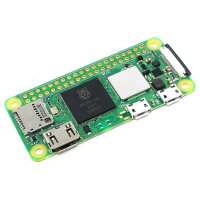
“This cheap little board provides the performance of a Pi3B+, but has fewer ports. It's really good for embedded projects, and I've connected my 5V supply directly to the board to remove the need for a USB C connector.
It was quite easy (with a hot air rework station) to add a sub-miniature RF socket and disconnect the on-board WiFi aerial. This allowed me to house the Pi Zero2 in a small diecast aluminium box, with an external WiFi aerial.
As usual, setting the Pi up to use SSL and loading the required software on to the SD card took just a few minutes.
It's simply a "cut-down" Pi3B+”
“Pi zero 2 w used to replace pi zero in a 'Jumbo - pistar' Hotspot.
Noticeable improvement - 27>40 Seconds boot time instead of 70>80 Seconds.
SKU: 103391 - Ceramic heat sink used on new PI 2 exact fit on CPU and keeps the cpu at 42'c when the Hot spot is in use (No pun ment - :) )
Pi zero 2 W was used to replace the original pi zero in a 'Jumbo - pistar' Hotspot after GPIO header soldered on.
Noticeable improvement - 27>40 Seconds boot time instead of 70>80 Seconds.
SKU: 103391 - Ceramic heat sink used on new PI zero 2 - fits perfectly as it is the same size as the CPU.
And Yes - I know I could have used a Metal heatsink - as the heatsink is only fixed in place with a sticky pad - if the Ceramic heatsink ever came off no damage would be done or shorting out the PI Zero or MMDVM HAT board, as a Metal heatsink would cause. M5YRG”
“Rasberry Pi Zero 2
This is my first Zero and I have to say it is a great little Pi, I have had a Pi from day one and love the way it has gone.
The Pi Zero 2 I have it installed into a Retroflag GPI Case and clock speed running Recalbox and it is working so well playing Roms.
I have ordered my second Zero 2 to see and use as a desktop and to play around with it is just a great size Pi and I have lots of ideas of how to use it, I will just see how it goes.
The only downside I can say at the minute is the ram size, But that is it.”