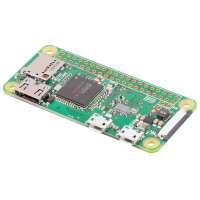
“I couldn't believe just how small it was. Still able to do everything I could on the original Pi. Also, a wide selection of quality cases. Highly recommended.”

“So I had a PiZero and was using it with a USB cable to my PC and connecting over IP using windows connection sharing and "arp -a" command to get the IP each time (steering well clear of Bonjour). This worked well but was a bit of a faff. Having the zeroW is so much easier as now I just have to plug it in to power and the router is set up to always assign the same IP.
What is extra neat is that I am able to share the SD card between the zero and the zero-W with no config changes. Very handy. I made some changes to the .profile file when I logged in too so I always know which one I'm connected to (despite them using the same card). I shared these with a friend who kindly tidied and published. Just for fun it tells you how many networks are nearby also (if you are on the zero-W that is) https://gist.github.com/mjeveritt/630c0792fe4a1ef7f1f6a5f351629b75”
“I've had Pi Zeroes before and found it awkward setting them up, having to switch between keyboard and mouse or wifi dongle which was always a pain! But now with the addition of a really cool new wireless feature, which is actually built in to the PCB (The little triangle between the HDMI and USB ports) you just load it up and connect to your network (only supports 2.4 GHz at the moment, no 5GHz support).
I'll definitely be buying the W again in the future!”