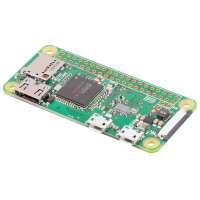
“I am a big fan of the Pi Zero W. Its size and versatility makes it perfect as a controller for lots of projects. While it is not as powerful as its larger equivalents it works fine for control purposes particularly where its small size is a big advantage.
In the early 1970s I built a digital alarm clock for my then future wife which we still have in use and is probably my oldest surviving designs. Recently I thought it would be fun to create a modern version still with a 1970s look & feel and decided that Pi Zero W was a good way to implement it. The WiFi network access is a a big advantage as it allows the clock to be locked to an a network source making it far more accurate that its old 1970s ancestor.
As well as the Pi Zero W my clock is using the AB Electronics real time clock module, an Adafruit HT16K33 LED matrix driver and I have also experimented with using a Pimoroni on/off shim.
The code is written in Python3 and implements both alarm and snooze functions. The alarm settings are stored in some of the spare battery backed-up memory on the RTC chip. I am obviously making use of the I2C bus which I have used lots of times before. However I found that these modern RPIs are much faster than the original versions and the I2C baudrate needs to be reduced to 35000 to maintain reliability.
The case for my clock has been hand-crafted using white black and red tinted perspex.
I am very pleased with the result. You can see a picture of it here:
https://www.pentaxuser.com/photo/rapberry-pi-digital-clock-104503”
“It's a cheap and cheerful controller with most of what you need.
Better serial I/O and one real USB port (or at least a 2x5 0.1" PC style header for it) would make it perfect.
You can do your main development on the full sized Pi-B type devices, and then move everything over to one of these and it pretty much just works.
Being able to embed this in your final device, then and SSH in over WiFi to fine tune it, is great.”
“Set up using the USB Stem to become a Pi Dongle. Allows me to quickly get access to a PI via plugging it into a laptop and complete a python book without having to setup a monitor/keyboard/mouse.”