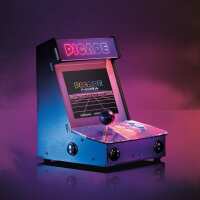
“I like the Picade, but I can't get it to work. I wanted to use a new Pi 4 and once I got it built and I turned it on, nothing on the screen. I took the SD card and put it into another Raspberry Pi 3 that I have and it loads okay. I added the "hdmi_force_hotplug=1" line to the end of the /bot/config.txt file. It boots fine with the Pi 3. I also tried the Pi 4 with the other setup, monitor, keyboard, and mouse and it seems that the mini-HDMI to HDMI cable that cam with the Picade doesn't work. I'm going to have to find another adapter cable to make sure that that is my problem, but I'm pretty sure that the problem is a bad adapter cable.”
“I've wanted a full size machine for years but never quite figured out where to put it. I noticed the Picade years ago when the Kickstarter came along, but the timing wasn't right. I bought this right after the Pi4 was released thinking. Fortunately I had a Pi3 as RetroPie, at the time of writing, was not yet ready for Pi4. The build was a breeze, but as has been pointed out has one really awkward step for the last two screws which hold the console in place. It's worth looking online for the build videos made by Pimoroni as they give lots of tips, and a useful one specifically for these final two screws. RetroPie will take some effort to work out, particularly if you're not familiar with emulation already. My advice; just stick with it - you'll be glad you did. Google for all the challenges you meet as most have already been solved by others. One really weak point is the stock joystick. For me, this was so loose and, could easily accidentally lock in the wrong direction. You can improve things by either replacing the joystick (a Sanwa JLF-TP-8YT is a drop in replacement with the same screw holes and connector), or you can just buy a stronger spring to improve the centering performance (I bought a 4lb spring for the Sanwa, but also bought a 2lb one and when fitted to the stock joystick it really made it feel much better). If you're pimping already, might as well fit an octagonal gate to the joystick. I will also note that the supplied speaker is more than adequate. All set up, this really feels and sounds just like an original arcade machine, albeit a small one, but that just makes it easy to use, then move back out of the way.
In the end, I have a perfect little machine. Great.”
“Excellent easy to make arcade emulator, delivered fast. A pity the manual is a bit unclear on the back of a poster but easy enough to find good video's and explanations on-line. Fun times exploring the classics ;)”
“Rock solid construction. Easy setting up (using the youtube tutorials and the amazing poster/blueprint). The joy of building is even better than playing with it. So you are on your 40's and you can't purchase a Porsche... this is the perfect auto-gift.”
“I've had this beauty in my possession for about two weeks now, and I still love it.
Building the Picade is actually a lot of fun. Whereas the instructions recommend a second person helping out, and mentions a build time of two to three hours, building it by myself only took about an hour and a half, and I consider myself having average skill. There were no difficulties throughout the build, and the instructions (including an errata page) are very well written. Yes, sometimes small nuts need to be tightened in tiny spaces, but with the right tools at hand, this went fairly well.
The quality of the parts is excellent. The casing, the buttons, the joystick and the Picade hat .. good and sturdy stuff, as is the packaging.
The screen fits very well into the casing, and is also excellent. This was my biggest fear, but that turned out to be unnecessary.
Overall, I'm very pleased with this (and so are my kids).
Some small tips:
- Have some nose pliers at hand
- Use a high quality power plug (2.5A for RPi 3B+)
- When mapping the buttons in RetroPie, be sure map the 'hotkey' button to be able to swap between games
And most of all, enjoy !”
“1 of the pieces of acrylic was drilled incorrectly so it simply doesn't fit so I can't get past stage 3 in the instructions, also the plastic clip that connects the ribbon cable to the screen is snapped on one side. Although the individual pieces seem well made, this is a manufacturing fault with mine so I simply cannot recommend this. I am left extremely disappointed with a half built arcade.”
“Assembly took between 3 and 4hrs to complete. Joystick was good quality item, buttons were less so, precut forms used to make the arcade case were generous in all joints - not baggy but fairly imprecise. The instructions were adequate but not what you’d expect from an item with a ticket price in excess of £100 fortunately there is plenty of good information on the internet. I would ask why this isn’t copied by the distributors into a version they can ship with the item. Fitting the control panel to the case needs the fingers of ET for the last two screws and bolts. The programming instructions are very poor, there is a clear expectation that you have used a pi board and memory card and can use github and other resources and understand copyright for ROMs etc. Fortunately I have rebuilt several full size arcade machines used Jamma and MAME previously but adapting their use for Retropie is not as simple as it is made out. Really needs a bare bones micro SD image created that can be downloaded with no ROMs - obviously. As an introduction to the pi and what can be achieved for a keen amateur I would say other than the programming the build is within most people’s grasp. Alternatively save your money and buy an old arcade case and put a jamma board or MAME pc in it if you have the space for just as much fun.”