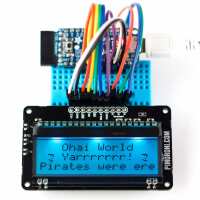
“Good display easy to use once you have sorted out the hardware connections. The following was my test program.
# Simple "Hello World" for the Display-O-tron DOGLCD 163
# The display is 3 lines of 16 characters
# Hardaware configuration The DOGLCD pins to the Pi pins
#
# VCC -> 5V
# GND -> GND
# RST -> BCM 12
# RS -> BCM 25
# CS -> BCM 8
# SCLK -> BCM 11
# MOSI -> BCM 10
# R -> BCM 5 The RGB pins can be changed
# G -> BCM 6 if the pins are already in use
# B -> BCM 13
#
# The software library required can be downloaded/installed using the following command
# curl https://get.pimoroni.com/displayotron | bash
import dot3k.lcd as lcd
import RPi.GPIO as GPIO
print("""
This example shows a basic "Hello World" on the LCD.
You should see "Hello World" displayed on your LCD!
Press CTRL+C to exit.
""")
#Set up General Purpose IO for the display background colour, RGB
GPIO.setmode(GPIO.BCM)
GPIO.setup(5, GPIO.OUT)
GPIO.setup(6, GPIO.OUT)
GPIO.setup(13, GPIO.OUT)
#Set the colour and contrast
GPIO.output(5, GPIO.HIGH)
GPIO.output(6, GPIO.HIGH)
GPIO.output(13, GPIO.HIGH)
lcd.set_contrast(18)
# Clear the LCD and display Hello World in the first line, then Line 2 and Line 3
lcd.clear()
lcd.set_cursor_position(0, 0) # in top line
lcd.write("Hello World")
lcd.set_cursor_position(1, 1) # in middle line
lcd.write('Line 2 text')
lcd.set_cursor_position(2, 2) # in bottom line
lcd.write('Line 3 text')”