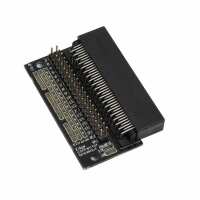
“If you buy a Micro:bit or Pico:ed, it’s hard to connect to signals from the board. The signals *are* presented on the edge connector of the board, but it’s non-trivial connecting onto them. If you want to build a design on a breadboard, for example, that you want to connect your microcontroller to; how do you connect the microcontroller to it ?
The Edge Connector Breakout Board helps solve this, by presenting all the signals as .1” spaced connector pins. You plug the Micro:Bit or Pico:Ed board into it.
The Pi-Hut sell male to female ‘jumper wires’. (Search for ‘jumper wires’.) One end of the jumper wires slides onto the appropriate pin on the Breakout Board, the other jumper wire end has a pin to poke into the breadboard containing your electronic design. Bingo ! Job done.
So, the Breakout Board and a set of Jumper Wires provides an electrical interface from a Micro:Bit or Pico:Ed to a prototyping breadboard.
Both of the above items are re-usable, and - I would say - an essential part of any kit you intend to buy for your microcontroller project.
Matt Lee
(Degreed computing chap, 40 years in the industry, and volunteering in education, now)”