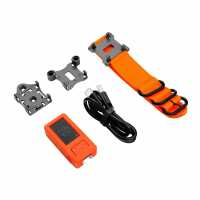
“Lovely little esp32 unit-love the big button! All the accessories make it able to mount it almost anywhere! Great service from PiHut. The order arrived within 24 hours.”
“The “M5StickCplus” is a very compact ESP32 unit, with 3 useful improvements (IMO) over the earlier M5StickC, being: an internal-passive-buzzer, a bigger screen, and a larger internal-battery.
It can be programmed using the Arduino IDE with the standard ESP32 software from https://github.com/espressif/arduino-esp32 together with the small library (IncludeLibrary/Add.ZIPLibrary”) from https://github.com/m5stack/M5StickC-Plus. This small library has the “M5StickCPlus.h” and “M5StickCPlus.cpp” files, as well as the library-files necessary to use the integrated hardware, and usage examples. In the Arduino IDE 1.8.x you need to select the board “M5Stick-C” and then add the line “#include ” at the top of your sketch. (Currently it doesn't seem to work with Arduino IDE v2.0!)
(Note that you do NOT need to install the “Additional Board Manager/.json file” from “m5stack.oss-cn-shenzhen.aliyuncs.com”).
I am using this unit as a home-brew “Fall-Detector/Call-Button”, worn round-the-neck by my elderly parent: The internal “6-Axis IMU” detects long-duration off-vertical position and automatically alerts me, and the big button acts as a back up to call me (both using the internet to send the alert to me).”
“For my project, it provides everything I need in a single portable package. Delivery was prompt (standard service) but postage costs seem artificially high for a small, light and low-value package”
“I built a basic data logger that uses an ENV hat to capture temperature, pressure and humidity.
This was easy to do using the M5 Flow software and I even set up a remote monitor having pushed the data through the M5 cloud.
The battery is the weak link but I just connect through a battery bank and it can data log for a very long period.
The ENV hat suffers from the proximity of the device and I did get better results with a remote sensor but a nice bit of kit and perfect for any new programmer.”