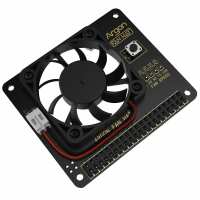
“I have 4 Raspberry Pi in various uses around my office, two as open media vault servers (one for file sharing and one as a backup server and pihole server), one as a 3CX Voip telephone server, and one being used for R&D projects. This intelligent fan unit poles the actual temperature of the CPU and turns on and off and modulates speed based on the CPU temperature, and is the best of all the cooling systems I have tried.
As a tip, I also use the PiHut heatsinks on the CPU and the main chipset chip, which fit with this unit, and it keeps the temperature even lower, running the fan less often.
Some people have said the fan is loud, but even at full blast I have never thought it is loud, it is quiet!
I have now upgraded 3 of my Pi 4 to using the ArgonOne cases with fans and heatsinks built in, because the 3 units have passed my testing phase, so would recommend the Fan hat if you do not need a case, and the ArgonOne cases (either the M.2 or standard ones) if you intend on putting it in a case, both are excellent solutions.”
“Very quiet and efficient, easy to use in the Argon case and many others, useful on/off button included, I have used it on the Raspberry Pi 4B but currently connected to a mini atom PC and doing a great job.”
“I have been searching for a decent cooling system, this works fine my PI4 in it's official case.
The temp varies but i haven't seen it go over 57 yet ( stock clock settings ), there is a script you can get via the terminal to set up custom fan speeds and limits or just set it up to run at 100%.
Also comes with a power button but using the official case there is no way to access this button, I think a white plastic screw on a spring maybe be an option here.
I don't have any issues with the noise but you do hear it when its working in a quiet room.
Brilliant bit of kit for its money, I was tempted but the fan shim but this just looks more solid.
One draw back i could see is the HAT header gives you female connections to the GPIO pins.
I would recommend it to anyone who needs something thats not fancy (altho it does have speed LEDS)
Great bit of kit for its price.
( I may cut a circular hole above the fan to help ventilation and cover with a grill along with the idea of putting a screw on a spring in the case to be able to use the power options.)”
“Great product. It mounts on the Pi GPIO header like most HAT's. Supplied with an instruction leaflet that explains how to set it up, download and install the script that controls the fan speed.
Once installed you get a desktop icon and clicking on it opens a simple text style terminal window where you type the option you want. You can use default settings or you can enter your own custom fan speed for different temperatures levels. The LED's on the board indicate five speed steps from 10% to 100%. . The fan is fairly quiet when running at 100%.
Also the board has a button which allows you to shutdown the Pi in various ways. I didn't test this too much as my Pi case is fully enclosed but it worked with no problems. I expect if the Pi crashed the button script might stop working but in normal circumstances it should work fine. Overall I think this is an excellent way to keep a Raspberry Pi cool.”
“The Argon Fan HAT from Pi Hut is a great low price and arrived in the post very quickly.
The main attraction for this fan was that it’s speed can be adjusted through software using a simple configuration file that maps multiple temperatures to multiple fan speeds as a percentage of full speed.
I particularly wanted a fan that would come on when the temperature hit a certain level and run faster if the temperature climbed too high.
The only gripe I have about the implementation of this HAT is that as soon as power is supplied the fan starts at 50%. When the Raspberry Pi finishes booting and loads the Argon software then it does indeed adjust the speed according to the current temperature. But what if I don’t want the fan to start every time the Pi gets power applied? And there lays the the subtle problem:
In my application, the surge of the fan starting at 50% is enough to cause a boot failure if I have other HATs powered up at the same time. Probably caused by a voltage drop, but it’s a real shame there is not a jumper on the Argon fan HAT to say don’t start at 50% by default (or at least delay spinning for a couple of minutes while other devices start and software can initialise)
The Argon fan HAT is well made and will no doubt suit most installations.”