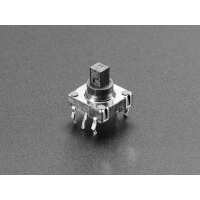
“Takes a little adjustment to get it to fit to standard pcb pins but once fit this thing is lovely to use. I’m fitting tall and short joystick options as well as a rocking dish sort of d-pad, works great, feels clear and decisive and it’s cheap! Very happy!”
“This compact component is a game-changer for anyone looking to add intuitive navigation to their project. It's convenient and space-efficient, and has a sharp click feel.
As the description says, it isn't perfectly aligned with the grid of a prototyping PCB, but its legs can be bent to fit it anyway.”
“Nice little navigation switch! Had to bend the pins a little bit to attach it to my board but it wasn't too much trouble. Just be careful not to break them when bending.”
“If it wasn't for the centre push function I would give this switch five stars. I bought both the switch and the rubber button and this review is for the combination. The left, right, up and down functions have a nice feel to them and work well. However, the push function requires more force than the others and doesn't connect very well. It's also very easy to push the button to the side when trying to push it in it and as a result operating one of the other switches. I found it to be so awkward that I couldn't use the push function reliably. Fortunately I can get away with just using the other four functions which are fine. As other reviewers have mentioned, the switch connections aren't on a 0.1" grid. That means you may have to fiddle a bit to connect them to your circuit. Four of the connections can be made to fit the 0.1" grid but the other two fall about half way between holes. I managed to fit them to a bit of veroboard without too much difficulty by drilling two extra holes for the odd pins and soldering wires directly to them.”