“Great little SBC, easy to use, documentation could be a but more fleshed out especially with regards to BASIC programming, but overall I'd recommend it to anyone wanting that 80's instant on and right into BASIC programming.”
“Now the Apple ][e emulator has been updated you have 32MB of usable file space for programs on an external flash stick, it makes this a super retro computer for all us hardware geeks of the day. No need to find space or parts for a vintage Apple ][. On top of this NeoBasic is well worth a look and in my case worth another Neo6502 just for running it. Great support on discord from the Olimex guy's and for NeoBasic. Other retro 6502 machines in the works.”
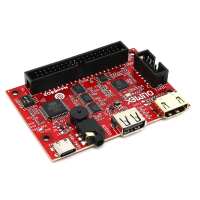
“At first glance this is yet another credit-card sized microcontroller similar to an Arduino type device. But of course the magic is that this contains a genuine 65C02 processor which is paired with an RP2040 which handles pretty much all the work that would normally be done by individually addressed memory-mapped peripheral chips in a traditional 6502-based computer.
It really was plug-and-go - add a USB keyboard, an HDMI monitor, and a source of electricity and you're up and running and into an Apple Prodos startup screen almost immediately. From there you can drop into Apple BASIC, Wozmon machine code monitor, or a variety of games.
Of course the real power as with any microcontroller board is in the ability to upload your own programs and connect external sensors and peripherals. I haven't had much chance to do this yet but as well as Olimex's standard UEXT connector, the entire 6502 bus is broken out into a 40-pin header.
Downsides: the documentation is a bit thin on the ground and spread out across a few different websites. It also wasn't immediately clear to me that the USB-C connector only provides power in - if you want to upload new firmware to the RP2040 then you need to connect a standard USB-A cable.”