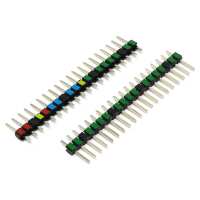
“This is a nice addition for somebody who uses the Pi Pico platform as a beginner. Identifying pins at a glance can save the day when avoiding shorts and misconnections.”
“I'm doing lots of little projects with Picos and find these really useful just to check that the connectors are in the right places rather than counting off pins every time. It would be nice if they were coloured on both sides and it doesn't feel quite right that they're 50% of the price of the Pico, but still very useful and I now order them with the Pico.”
“I took advantage of a subscription offer that included a free Pi Pico W. It was however an unmounted board and to actually get it interacting with hardware, I needed to give it some pins so it could go onto a breadboard. I had two choices on Pi Hut - plain black or a pair with colour markings. Now my eyesight isn't what it was and I reckoned the slightly more expensive colour-coded pins were likely to help me wiring up the board to components
These were simple enough to fit. Press headers into breadboard, sit Pico on top (checking the board was right way round), and solder to board.
I can say that the colours definitely make it easier to see which pin is which eg on the one side the 2-4-4-4-2 pattern of GPIO pins interspersed with GND makes it easier to find the pin I want, and on the other side picking out the supply voltage pins. For learning or making your own projects they get my recommendation.”
“Great connectors that were easily soldered onto the Pi Pico W using some breadboard to hold them in place.
No instructions showing correct orientation come with the connectors so I advise to do as I did and check pinouts online before soldering. Also make sure that you have the colour-coded sections on the outside, not underneath your Pico! :)”