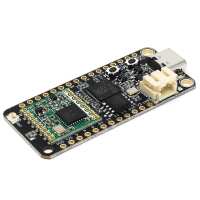
“I have previously been using Raspberry Pi Pico's + Adafruit RFM95W breakout boards to experiment with LoRa. When it came to building an additional set of hardware the Challenger RP2040 fit the bill perfectly, reducing the cost and complexity of my build.”
“RP2040 seems to be ok.
Docs from I labs are ok
Using this liberty to get the LoRaWAN working.
Well it’s not working so far, seems to be some issues with the LoRa module….
https://github.com/ArmDeveloperEcosystem/lorawan-library-for-pico?tab=readme-ov-file”
“Highly recommended. The integrated radio is much neater than my previous 2 board solution. I was slightly concerned by the limited documentation and reviews but for the price, I thought these were worth a try. I guess the SW libraries have moved on since some of the earlier reviews. So far I've managed to get LoRa working using the Arduino IDE fairly easily and LittleFS using a portion of the FLASH is also working out-the-box.
Board support: https://github.com/earlephilhower/arduino-pico
LoRa Library https://github.com/sandeepmistry/arduino-LoRa (installed using the standard library manager)
Pins details from here: https://github.com/earlephilhower/arduino-pico/blob/master/variants/challenger_2040_lora/pins_arduino.h
I added:
LoRa.setPins(9,13,14); // CR RST IRQ
to the basic examples provided with the LoRa library.”
“Great to be able to send data over Lora without having to connect a separate board to the Pico.
While examples are being developed by ilabs I used some existing RFM95 micropython code. If the GPIO pinout for SPI1 is not yet fully detailed on the ilabs datasheet, you can check it from their Eagle schematic of the board.
SCK = 10
MOSI = 11
MISO = 12
CS = 9
Reset = 12”
“2 stars is not against The Pi Hut but iLabs for hiding information. The Pi Hut were professional as ever, promptly shipping. Can't fault that.
However, finding information about this board is a real headache. In particular the pin assignments for SPI1 (which the data sheet says it uses). I had to install Eagle to read the board files to get that information, which is needed when configuring Lora. There aren't any example codes that I can find and after several days of trying to get pico-lorawan code to work I gave up. I might try micropython later.
I eventually found this:-
https://gitlab.com/invectorlabs/hw/challenger_rp2040_lora
but don't expect much. You can't raise issues and it only includes the schematics for the board.
It isn't a cheap board - I expected a lot better but will come back to it when my headache subsides.”