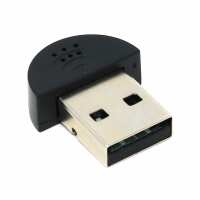
“This mic is fine for simple tasks. However, if you are a Raspberry Pi tinkerer like me, you will find this product very disappointing. Can you record two of these microphones at the same time on a Pi Zero 2? No. How configurable is it? Not very - 44.1 or 48kHz rate. 16-bit only.
The packaging says this product is "Plug type: USB 2.0", but a hardware check ("lsusb -t" on the command line) shows this to be 12MB (USB1.1). This messes up the speed of all other devices on my USB hub (Zero4U supplied by PiHut).
I have been torturing myself to get this thing to do some multi tracking. Don't even bother!”
“Works really well once set up - auto gain appears to be appropriately sensitive. A bit of help for anyone wanting to use this on a Pi from the command line. If you reboot after plugging the microphone in, you should be able to check for its presence with the following command:
dmesg | grep C-Media
with a response similar to this:
[ 2.743996] usb 1-2: Manufacturer: C-Media Electronics Inc.
Typing
lsusb
Should reveal it's a PCM2902:
Bus 001 Device 002: ID 08bb:2902 Texas Instruments PCM2902 Audio Codec
You'll then need to update the firmware:
sudo apt-get update
sudo apt-get upgrade
This will update the system packages, and should include a firmware update for the mic as well - you should see output relating to firmware updates.
You'll then need to reboot:
sudo reboot
After the reboot, you'll want to see info about the audio cards present in the system:
cat /proc/asound/cards
On a Pi5, the USB card may appear as ID 2 (as the two HDMI outputs are 0 and 1):
0 [vc4hdmi0 ]: vc4-hdmi - vc4-hdmi-0
vc4-hdmi-0
1 [vc4hdmi1 ]: vc4-hdmi - vc4-hdmi-1
vc4-hdmi-1
2 [Device ]: USB-Audio - USB PnP Sound Device
C-Media Electronics Inc. USB PnP Sound Device at usb-xhci-hcd.0-2, full speed
The adafruit instructions for this refer to a headphone jack (and you'll need to follow them for a Pi”