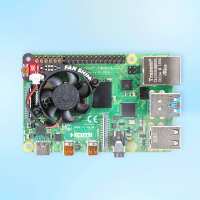
“I love my Fan Shim: I got the following temps 52c at the end of the run/CPU stress test. The ambient was a bit more the 20c, I use (with a bit of modification and glue) the "Raspberry Pi 4 Heatsink" (only £2.40) + "Ninja – Pibow Coupé 4" + "Fan SHIMI."
I ran a prime benchmark test shown in this vid: https://www.youtube.com/watch?v=AVfvhEJ9XD0&t=88s
The results are:
To run the same test you will need to install sysbench via terminal/copy script below:
"sudo apt-get install sysbench"
#!/bin/bash
clear
#nice little loop
or f in {1..7}
do
vcgencmd measure_temp
sysbench --test=cpu --cpu-max-prime=25000 --num-threads=4 run >/dev/null 2>&1
done
vcgencmd measure_temp
=========
> vcgencmd measure_temp
> sysbench --test=cpu --cpu-max-prime=25000 --num-threads=4 run >/dev/null 2>&1
> done
temp=39.0'C
temp=51.0'C
temp=51.0'C
temp=53.0'C
temp=51.0'C
temp=52.0'C
temp=52.0'C
pi@Rip4:~ $
pi@Rip4:~ $ vcgencmd measure_temp”
“One of the main things I wanted out of the Pi 4 was OpenGL ES 3.0 and more CPU crunching, which the Pi 4 gives in spades. However, the little fellow gets pretty toasty now, on first test it was showing a range of around 75-80 degrees. Pimoroni Fan SHIM to the rescue! The assembly was pretty straightforward, though it's a little fiddly connecting the cable but everything came together nicely. It fits pretty snugly and looks dapper in it's Pimoroni case. But how does it perform? Well, I'm astonished to say it takes away at least 40 degrees of heat and pushing both CPU and GPU as hard as it will go I've been really pleased with this fan. Not too noisy, though not silent (and I have checked fittings). Highly recommended, well done guys!”