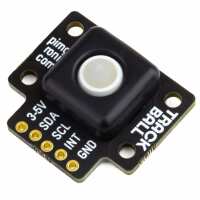
“I had a hard time getting the trackball working with evdev-mouse.py. The Github page has not been kept up to date and I had to do some digging to get it working. The main issue that stumped me was being told the INT pin isn't needed when in fact it needs to be connected to GPIO 4/pin 7. INT is required to run evdev-mouse.py. From my attempts, the simplified install doesn't work for Bullseye. Bullseye must be manually installed. Follow directions for manual install on the github page, then follow these modified directions for evdev-mouse.py to work on startup.
cd examples
sudo apt install python3-evdev
sudo modprobe uinput
sudo cp 10-trackball.rules /etc/udev/rules.d/
sudo udevadm control --reload-rules”
“There is an issue with the software perhaps, the Interrupt line toggles each time the sensor is used on the I2C Bus. Either don't use the Interrupt line, or else disable it after first use in your controller so it gets impervious to the Pin's constant toggling from the sensor. Then once done reading sensor data, reconnect the interrupt line. The sensor itself works nicely, and I've added it as a small mouse/button on my cyberdeck.”
“Delivery was quick and the trackball works perfectly. Currently using it on a wired build but it would be great to see a version usable on a wireless build without draining the battery too quickly. An excellent addition to my current keyboard nonetheless.”
“Great product. Really enjoy using this little thing. Easy to setup, I'm currently using it with qmk firmware on a custom mechanical keyboard. I plan to use the zmk firmware to implement it in a wireless keyboard.”
“It's good I didnt get started using it. But this is the only option when it comes to qmk supported tiny trackball modules. The shipping to mainland US is surprisingly quick with UPS though.”