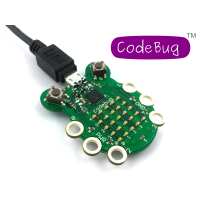
“I ordered the CodeBug to get my 6yr old daughter into coding and give her some basic knowledge aboout it befor she will go to primary school this year. It was a great fun for both of us to think about what we want to do with it and to bring our "vision" to life.
Another wonderful thing about the bug are the legs, that helped us do some experiments about conduction and input/output.”
“Amazingly easy way to get my kid started with electronics, computing and art/design all in one tiny package. Very impressed by the *free* resources at codebug.org.uk and the add-on 'star'. Our first project was a CodeBug powered pencil case!”
“This was the quickest start with a new computer I’ve ever met. There is no need to download or install anything! You just need your CodeBug, the USB Micro B cable and a browser running on your computer. Within a few minutes of following the instructions on the CodeBug website you will have your new toy merrily flashing away displaying your name on the LEDs. If you have used Scratch you will find the block programming interface very simple to use.
Once you have mastered control of the 25 pixel display you can move on to controlling the 4 inputs and outputs. You can attach LEDs, switches, sensors, motors etc. to the input and output rings with croc-clips and expand your skills. These versatile Input/Output rings can also be used as touch sensors, like MaKey MaKey:tm:.The website has easy to follow instructions and tutorials.
If you would rather control your CodeBug with Python there are instructions on how to program the Codebug to accept instructions from a Raspberry Pi, tether it to the Pi with your USB cable and then read switches and set LEDs on/off from Python scripts. It can also be plugged directly onto the Pi’s GPIO pins. Future expansion boards, �Tails’, are promised providing access to I2C and SPI.
This inexpensive and delightful little computer will provide hours of amusement and help you to learn to code in a very enjoyable way.”