

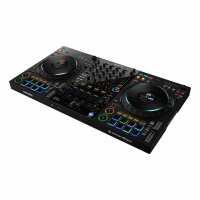
The DDJ-FLX10 is a powerful and versatile DJ controller designed for modern performance needs. With its intuitive layout and extensive feature set, it offers DJs of all levels a professional-grade experience that enhances their creativity and performance. At the heart of the DDJ-FLX10 is its full-size jog wheels, which offer the perfect balance of responsiveness and precision. DJs can scratch, mix and manipulate tracks with ease, thanks to the wheels' low latency and high accuracy. The jog wheels are complemented by eight large, multi-colored performance pads, which can be used to trigger samples, hot cues, and more. The DDJ-FLX10 also features a dedicated mixer section, complete with three-band EQ, filter knobs, and a crossfader. This allows DJs to blend tracks together seamlessly and create dynamic mixes that keep the crowd engaged. One of the standout features of the DDJ-FLX10 is its compatibility with a range of DJ software, including Serato DJ Pro and rekordbox. DJs can use the controller with their preferred software and take advantage of its full feature set, including the ability to create custom mappings for unique performance setups. Other notable features of the DDJ-FLX10 include its built-in sound card, which provides high-quality audio output, and its connectivity options, which include XLR and RCA outputs, as well as a microphone input. Overall, the DDJ-FLX10 is an excellent choice for DJs who demand top-tier performance and flexibility from their equipment. Its combination of responsive jog wheels, versatile performance pads, and extensive connectivity options make it an ideal choice for any DJ looking to elevate their performance. KEY FEATURES Track Separation for innovative performances including live mash-ups If you want to create unique live performances that aren’t possible with conventional DJ gear, the DDJ-FLX10 has the answer. With its Track Separation technology, you can simply load the regular songs from your music library and use the controller to create remixes and mash-ups on the fly by independently manipulating the 3 key parts of the music: vocals, drums, and inst (other instruments including bass and synths). For example, you can play the instruments and drums from one track while the vocal from the track on the other deck plays over the top. There are dedicated color-coded buttons to control each part, so you’ll always have a clear visual grasp of what’s playing. - Active Part and Part Iso Individually adjust the volume for the vocals, drums, or inst to mix in new ways. You can also choose to mute any combination of the 3 parts to make live mash-ups with other tracks. - FX Part Select Choose which parts of a track you want to apply effects to, and create your own remix live. For example, you could add echo to the vocals but leave the other parts alone. - Part Instant Doubles Isolate a specific part of the track (vocal, drums, or inst) and transfer it to another deck so you can scratch it. Expanded On Jog Display With the new On Jog Display, which is evolved from the DDJ-1000, you can customize the information you see on the jogs so there’s no need to take your eyes off the decks. Choose from 4 modes as detailed below, some of which show 3Band Waveforms (rekordbox only), the same as the CDJ-3000 flagship multi player. You can also keep an eye on new Mix Point Link information, rekordbox vocal position analysis information, and Performance Pad status. - Deck Info mode - shows the information about the deck, including the Overall Waveform. (When using Serato DJ Pro, this mode shows the virtual deck of Serato DJ Pro.) - Waveform mode - shows the Zoomed Waveforms for 2 decks. - Artwork display - shows the artwork for the track that’s playing. - DJ Logo display - shows your own logo or favorite image on each deck after using the Image Transfer Tool for PC/Mac. New Mix Point Link for seamless transitions Take advantage of a completely new playback concept in rekordbox that enables you to create slick musical progression in your sets by linking mix points in tracks so the next song kicks in at the perfect moment. You might set the next track to start from the beginning of its melody when the vocal of the current song ends, ensuring a seamless transition without a sound clash. There’s no need to count down or press play manually, which also leaves your hands free
Visit Product PagePhone:
01325 480507
Location:
65 Stockton Road Darlington County Durham DL1 2RZ
County Durham
DL1 2RZ



